---
title: "MCP and Web Search: A Deep Guide to Building Search Tools for AI Agents (2026)"
dek: "Model Context Protocol lets an agent call your web-search tools without bespoke integration code. A deep, current guide to MCP, the 2026-07-28 stateless spec, and a real runnable Keiro MCP server in Python and TypeScript."
category: "guide"
tags: [guide, mcp, protocol, llm-tools, integration, keiro]
author: "Manny"
published: 2026-04-01T09:00:00+00:00
updated: 2026-07-16T00:00:00+00:00
url: https://keirolabs.cloud/blogs/guide/mcp-model-context-protocol-web-search-2026-guide
---
If you build AI agents, you have run into the same wall for years. Every framework (LangChain, LlamaIndex, CrewAI, raw function calling) ships its own tool abstraction, so a web-search tool you write for one does not run in another. Model Context Protocol (MCP) fixes that. You write the tool once, as an MCP server, and Claude Desktop, Cursor, Cline, the Claude API, and any MCP-compatible client can call it. This is a deep, current guide to what MCP actually is, how the 2026-07-28 release candidate changes it, and how to build a real, runnable MCP server that wraps a web-search API. The API we wrap is ours, Keiro, because I know its endpoints cold, but the patterns hold for any search provider.
9Keiro v2 endpoints
100msindexed search
$1Keiro / 1k
94SimpleQA
97MMCP SDK downloads/mo
TL;DR · MCP for web search in 2026
- **What MCP is:** an open JSON-RPC 2.0 protocol that lets an LLM client discover and call tools on a server you write. Governed by the Linux Foundation Agentic AI Foundation since December 2025.
- **The 2026-07-28 RC:** stateless core (no `initialize`, no `Mcp-Session-Id`), required `Mcp-Method`/`Mcp-Name` headers, `ttlMs`/`cacheScope`, Multi Round-Trip Requests, full JSON Schema 2020-12, OAuth 2.1 Resource Server (RFC 8707). Final ships July 28, 2026.
- **The pattern for search:** expose five tools (`web_search`, `search_content`, `answer`, `deep_research`, `extract_url`), write descriptions that say when *not* to call each one, validate args inside the body, return errors as dicts, keep the key in an env var on the server.
- **The SDK split:** Python v1.x `FastMCP` is the production-stable line; v2 renames it `MCPServer` and ships July 27 to 28, 2026. TypeScript v2 splits into `@modelcontextprotocol/server` + `/client`, ESM-only, Zod v4 / Standard Schema.
- **The payoff:** one server, every MCP client, the key stays server-side, and the model picks the cheap tool when your descriptions are honest about cost and latency.
## What MCP actually is
MCP is an open, JSON-RPC 2.0 based protocol that Anthropic released in November 2024 to standardize how LLM clients connect to external tools, data, and prompts. In December 2025 governance moved to the Linux Foundation's Agentic AI Foundation (co-founded by Anthropic, Block, and OpenAI, with Google, Microsoft, AWS, Cloudflare, and Bloomberg). By mid-2026 there are about 97 million monthly SDK downloads and 10,000+ public servers.
The three primitives:
- **Tools** are functions the model calls with structured arguments. A web-search tool is the canonical example. As of the 2026-07-28 spec, tools support full JSON Schema 2020-12 (`oneOf`, `anyOf`, `allOf`, `$ref`/`$defs`), and `structuredContent` can be any JSON value, so you can return typed objects, not just text blobs.
- **Resources** are read-only data addressed by URI, fetched and passed to the model as context. They now carry `ttlMs` and `cacheScope` for caching.
- **Prompts** are reusable prompt templates the host offers to users.
Transports:
- **stdio** for a local server spawned as a child process by one client (Claude Desktop, Cursor, an IDE). No network, no auth. This is the default for local tools.
- **Streamable HTTP** for remote or multi-client use. One endpoint handles POST (JSON-RPC) and can answer with a single JSON object or an SSE stream scoped to that request. As of 2026-07-28 it is stateless-capable.
- **HTTP+SSE (legacy)** is deprecated since March 2025. Vendors are setting hard cutoffs (Atlassian: June 30, 2026). Do not build new servers on it.
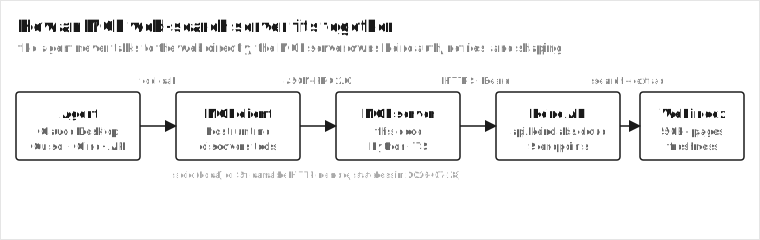
The agent never talks to the web directly. The MCP client discovers tools, the server owns Keiro auth and shaping, and the index returns ranked pages and clean text.
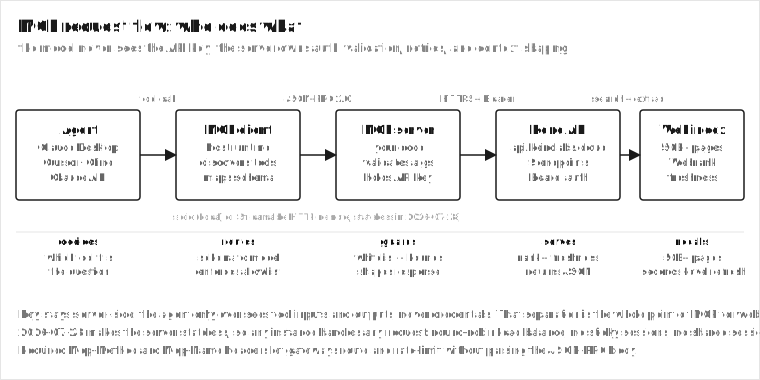
The core idea: the agent never talks to the web directly. The MCP client (the host runtime) discovers the server's tools, and the model decides when to call them. The server owns the API key, the retries, the response shaping, and the context-budget discipline. That separation is the whole point. Your search API key never reaches the model, and you control exactly what shape comes back.
## The 2026-07-28 spec: stateless, routable, cacheable
The 2026-07-28 release candidate (RC locked May 21, 2026; final ships July 28, 2026) is the largest revision since launch, and it changes how you deploy MCP servers. The short version: MCP servers can now be fully stateless, which means they scale horizontally like any HTTP service.
What actually changes, point by point:
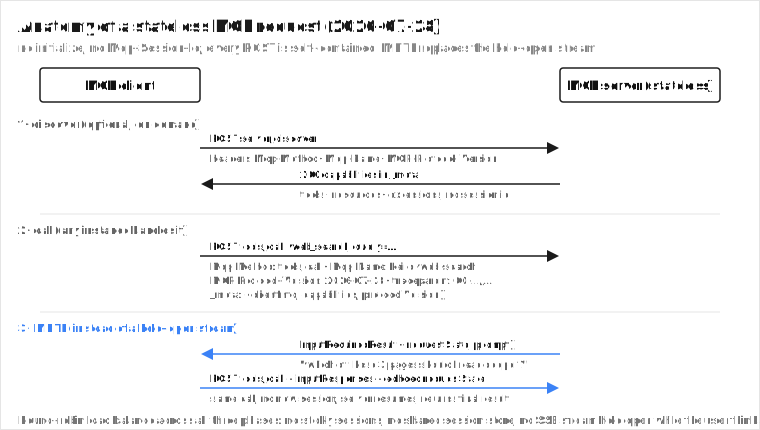
- **Stateless core.** The `initialize`/`initialized` handshake and the `Mcp-Session-Id` header are gone (SEP-2575 and SEP-2567). Every request is self-contained: protocol version, client info, and capabilities ride in `_meta`. A new `server/discover` method lets clients fetch capabilities on demand. Any server instance handles any request, so you put MCP servers behind a plain round-robin load balancer with no sticky sessions.
- **Routable, cacheable transport.** `Mcp-Method` and `Mcp-Name` headers are required on every Streamable HTTP POST (SEP-2243), so gateways and rate limiters route without parsing the body. `MCP-Protocol-Version` is required too. The GET stream endpoint is removed; long-lived change notifications now come via a `subscriptions/listen` request stream. List and resource-read results carry `ttlMs` and `cacheScope`, modeled on HTTP `Cache-Control`. W3C Trace Context propagates through `_meta` for distributed tracing. A header/body mismatch is rejected with error code `-32020` (`HeaderMismatch`).
- **Multi Round-Trip Requests (MRTR).** Instead of holding an SSE stream open for a long interactive task, the server returns an `InputRequiredResult`, and the client re-issues the original call with `inputResponses` and echoed `requestState` (SEP-2322). Server-initiated requests may only happen while the server is already processing a client request. For web search, this is how a tool asks "which of these three pages should I read deeper?" without holding a connection open for minutes.
- **Extensions are first-class.** Identified by reverse-DNS IDs, negotiated via an `extensions` map, living in `ext-*` repos. Two ship with this release: MCP Apps (server-rendered interactive HTML in sandboxed iframes) and Tasks (graduated from experimental, reshaped around the stateless model).
- **Authorization hardening.** Six SEPs align MCP with OAuth 2.0 and OpenID Connect: `iss` validation per RFC 9207 to stop mix-up attacks, OIDC `application_type` during Dynamic Client Registration (so desktop clients are not defaulted to `web` and rejected for localhost redirects), credential binding to the issuing authorization server. The 2025-11-25 spec already made MCP servers OAuth 2.1 Resource Servers with RFC 8707 Resource Indicators (audience-scoped tokens per server).
No initialize, no Mcp-Session-Id, no held-open SSE stream. Every POST is self-contained. MRTR turns a long interactive extraction into a request, a clarifying question, and a resumed request.
A few things are deprecated (advisory, with at least 12 months of life): Roots (use tool parameters or resource URIs), Sampling (call LLM providers directly), and Logging (use `stderr` for stdio and OpenTelemetry for structured observability). Deprecated is not removed. The spec gives vendors a year to migrate.
If you ship a server today on the stable v1.x SDKs, it keeps working. `2026-07-28` clients fall back to the `initialize` handshake when they hit a `2025-11-25` server. You do not have to migrate on day one. Migrate when the stable SDKs land on July 28, 2026, not on the prerelease.
### The SDK landscape, July 2026
Two SDK lines matter for this guide, and getting them mixed up is the number one source of confusion I see in issues.
Python v1.xfrom mcp.server.fastmcp import FastMCP. Stable on PyPI. Production. Built around the 2025-11-25 spec. Last referenced version v1.28.1. Use this today.
Python v2FastMCP renamed to MCPServer at mcp.server.mcpserver. v2.0.0a1 June 11, 2026, v2.0.0b1 June 30, 2026. Stable v2.0.0 targeted July 27 to 28, 2026. Opt-in: pip install mcp==2.0.0b1.
TS v1.x single @modelcontextprotocol/sdk package. Supported production release until July 28, 2026.
TS v2 beta split into nine packages: @modelcontextprotocol/server, /client, /core, framework adapters, plus /server-legacy and /codemod. ESM-only, runtime-neutral root entries, Node-only code behind ./stdio subpath. Uses zod/v4 and accepts any Standard Schema lib (Zod v4, ArkType, Valibot).
v2 breaking changes worth memorizing: camelCase fields go snake_case (`inputSchema` to `input_schema`, `isError` to `is_error`); `mcp.types` splits into a standalone `mcp-types` package; `McpError` becomes `MCPError`; the low-level Server replaces decorator handlers with `on_*` constructor params; WebSocket transport and the experimental Tasks API are removed. If you maintain a library, pin `mcp>=1.27,<2` so the stable v2 release does not surprise your users.
## Why MCP matters for web search specifically
Web search is the tool agents call most, and it is where MCP's "build once, run anywhere" payoff is biggest. Three reasons it is not just a convenience:
1. **One integration, every client.** A Keiro search tool written as an MCP server runs in Claude Desktop, Cursor, Cline, and the Claude API MCP connector with zero per-client glue. Before MCP, you wrote a LangChain tool, a CrewAI tool, and a function-call schema, all wrapping the same HTTP call.
2. **The key stays server-side.** The model never sees your API key. The server holds it in an env var and signs every request. This is a real security boundary, not a convention.
3. **You control the context budget.** Search results are the biggest context hog in most agents. The server decides how many results, how much page text, whether to return embeddings, and whether to summarize. Get this right and the agent stays fast and cheap. Get it wrong and you blow the context window on one query.
Each layer has one job. The agent decides which tool fits. The client routes the schema and enforces the allowlist. The server guards args and shapes the response. The API serves rank and freshness. The index recalls 50B+ pages. The key never leaves the server.
A concrete scenario. You ship a research agent that answers "summarize the last 24 hours of news on the SEC vs Coinbase filing." Without MCP, that is a LangChain `Tool` subclass for the LangChain build, a CrewAI `BaseTool` for the CrewAI build, and an OpenAI function schema for the function-calling build. Three wrappers around the same `POST https://api.keirolabs.cloud/api/v2/search/content`.
With MCP, you write `search_content` once. Claude Desktop calls it. Cursor calls it. The Claude API MCP connector calls it. The key lives in `KEIRO_API_KEY` on the server. The model never sees it. One server, three clients, one source of truth.
The math on a 1,000-query day, Startup list price ($1/1k credits):
| Tool path | Credits/q | Cost/day | When the model picks it |
| --- | --- | --- | --- |
| `web_search` only | 1 | $1.00 | 700 of 1,000 lookups |
| `search_content` (RAG) | 3 | $9.00 for 300 calls | 300 of 1,000 need page text |
| Mixed, model picks right | ~1.6 | ~$1.60 | honest descriptions |
| Model always calls `deep_research` | 20 | $20,000 | your descriptions failed |
The difference between a well-described toolset and a lazy one is roughly 12x on cost for the same workload. That is the entire budget for the search-tool layer, decided by the words you put in the description strings.
## Keiro's endpoints, mapped to MCP tools
Keiro exposes nine v2 endpoints. Not all of them should be MCP tools. Here is the mapping I use, with the credit cost and the latency so the model can pick the right one.
| Keiro endpoint | MCP tool | Credits | Latency | When the model should call it |
| --- | --- | --- | --- | --- |
| `/api/v2/keiro` | `web_search` | 1 | 100ms to 1s | Find pages about a topic. Default for most queries. |
| `/api/v2/search/fast` | (folded in) | 1 | ~1s | Always-fresh when indexed looks stale. Rarely a separate tool. |
| `/api/v2/search/flash` | (skip) | 1 | ~500ms | Autocomplete / type-ahead. Usually a UI concern, not a tool. |
| `/api/v2/search/content` | `search_content` | 3 | ~3s | RAG. Search plus clean page text in one call. |
| `/api/v2/data` | `extract_structured` | 2 | ~2s | Structured data extraction from a URL. |
| `/api/v2/extract` | `extract_url` | 3 | ~2s | Clean text from one known URL. |
| `/api/v2/answer` | `answer` | 5 | ~varies | A synthesized, cited answer, not a link list. |
| `/api/v2/agentic` | `deep_research` | 20 | 30s to 5min | Hard, multi-hop questions. Tell the user it is slow. |
| `/api/v2/search/batch` | (not a tool) | 1/query | async | Bulk backfills. Drive it from your app, not the model. |
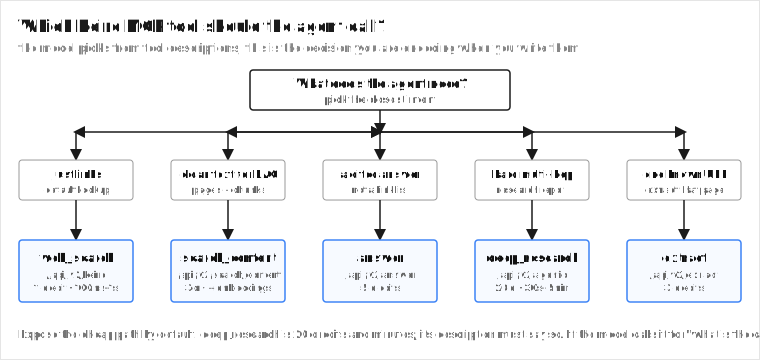
The decision the model has to make, and the one your tool descriptions have to make easy, is: cheap fast search (`web_search`, 1 credit) versus RAG-ready content (`search_content`, 3 credits) versus a finished answer (`answer`, 5 credits) versus deep multi-step research (`deep_research`, 20 credits) versus extracting one known URL (`extract_url`, 3 credits). Good tool descriptions are how you keep the model from calling `deep_research` for a simple lookup.
The decision your tool descriptions encode. Expose the cheap path by default; reserve the 20-credit deep_research for the hard multi-hop branch and say so in its description.
Why `/search/fast` and `/search/flash` are not separate tools: the model cannot tell three near-identical search variants apart, and exposing all three means it picks the wrong one a third of the time. Fold "always-fresh" into `web_search` as a `fresh=true` flag if you need it, and leave flash for your UI's autocomplete. One tool per intent.
Why `/search/batch` is not a tool at all: it takes thousands of queries in one async job. The model should not be orchestrating 10,000-query backfills. Drive batch from your application code, where you control concurrency and retries, not from a tool call the model fires once and forgets.
## Build the server in Python (FastMCP, v1.x stable)
This is real, runnable code on the production-stable v1.x SDK. It uses `httpx` for HTTP, reads the key from an env var, validates inside each function, logs to `stderr` (never stdout, that corrupts the JSON-RPC stream), and returns informative errors instead of crashing.
```python
# keiro_mcp.py
# A runnable MCP server wrapping Keiro's web-search API.
# Stable v1.x SDK. For the 2026-07-28 RC, see the note at the bottom.
# Run: KEIRO_API_KEY=keiro_xxx uv run mcp run keiro_mcp.py
# or install into Claude Desktop: fastmcp install claude-desktop keiro_mcp.py
import os
import sys
import json
import httpx
from mcp.server.fastmcp import FastMCP
KEIRO_BASE = "https://api.keirolabs.cloud"
KEIRO_KEY = os.environ.get("KEIRO_API_KEY") # never hardcode; pass via env
mcp = FastMCP("keiro-web-search")
def _headers() -> dict:
if not KEIRO_KEY:
# Return a clean error the model can act on. Do not raise into the stream.
raise RuntimeError("KEIRO_API_KEY env var is not set; pass it to the server process.")
return {"Authorization": f"Bearer {KEIRO_KEY}", "Content-Type": "application/json"}
def _post(path: str, body: dict, timeout: float = 60) -> dict:
try:
r = httpx.post(f"{KEIRO_BASE}{path}", headers=_headers(), json=body, timeout=timeout)
r.raise_for_status()
return r.json()
except httpx.HTTPStatusError as e:
# Shape a useful error so the model can decide what to do next.
return {"error": "keiro_http_error", "status": e.response.status_code,
"body": e.response.text[:500]}
except httpx.HTTPError as e:
return {"error": "keiro_transport_error", "message": str(e)}
@mcp.tool()
def web_search(query: str, max_results: int = 10) -> dict:
"""Search the live web for pages about a topic. Returns titles, URLs,
snippets, and a relevance score per result. This is the default tool for
most queries. Use search_content instead when you need the full page text
for RAG. query: 1-500 chars. max_results: 1-50 (default 10). 1 credit."""
if not (1 <= len(query) <= 500):
return {"error": "query must be 1-500 chars"}
if not (1 <= max_results <= 50):
return {"error": "max_results must be 1-50"}
return _post("/api/v2/keiro", {"query": query, "maxResults": max_results})
@mcp.tool()
def search_content(query: str, max_results: int = 3, mode: str = "ai",
with_embeddings: bool = False) -> dict:
"""Search the web AND extract clean page text in one call. Use this for RAG,
summarization, and research agents: the result includes markdown-ready body
text, not just snippets. With with_embeddings=true, each content chunk
comes back with a vector embedding, so you get search + clean text + RAG
chunks in a single call with no separate embedding step. query: 1-500
chars. max_results: 1-5 (default 3). mode: ai|deep|medium|light (default ai).
3 credits, ~3s."""
if not (1 <= max_results <= 5):
return {"error": "max_results must be 1-5 for search_content"}
if mode not in ("ai", "deep", "medium", "light"):
return {"error": "mode must be ai|deep|medium|light"}
body = {"query": query, "maxResults": max_results, "mode": mode}
if with_embeddings:
body["embeddings.enabled"] = True
body["embeddings.dimensions"] = 768
body["embeddings.chunkSize"] = 500
return _post("/api/v2/search/content", body, timeout=90)
@mcp.tool()
def answer(query: str) -> dict:
"""Get a synthesized answer with source citations for a question. Use
when the user wants an answer, not a list of links. 5 credits."""
return _post("/api/v2/answer", {"query": query}, timeout=60)
@mcp.tool()
def deep_research(query: str) -> dict:
"""Run multi-step agentic research across sources, returning a synthesized
report with citations. Use for hard, multi-hop questions that one search
cannot answer. 20 credits, 30s to 5min. Tell the user it may take a while."""
return _post("/api/v2/agentic", {"query": query}, timeout=600)
@mcp.tool()
def extract_url(url: str) -> dict:
"""Extract clean, structured content from a single URL. Use after web_search
when the model needs the full text of one specific result. 3 credits."""
if not url.startswith(("http://", "https://")):
return {"error": "url must be http(s)://..."}
return _post("/api/v2/extract", {"url": url}, timeout=60)
if __name__ == "__main__":
# stdio transport for Claude Desktop and local clients.
# Never print() to stdout in a stdio server; it corrupts the JSON-RPC stream.
mcp.run(transport="stdio")
```
A few things in that code are doing real work, and they are the difference between a demo and a production tool.
The tool descriptions are written for the model, not for a human. Each one says when to call it and when to call a different one instead. `web_search` tells the model to use `search_content` for RAG. `search_content` explains the embeddings flag. This is how you stop the model from picking the 20-credit `deep_research` tool for a one-word lookup. Tool descriptions are part of the attack surface and part of the UX. Spend time on them.
Validation is inside the function, not only in the type hint. Type hints validate shape. The model is an untrusted caller, so you whitelist values (`mode` must be one of four strings) and bound ranges (`max_results` 1 to 50). This is the MCP security rule: tool arguments are model-provided, untrusted data. Validate inside the body, and never f-string them into SQL, shell, or paths.
Errors are returned as structured dicts, not raised. A `raise` inside a tool becomes an MCP error the model often cannot reason about. A dict with `error`, `status`, and a truncated body lets the model decide whether to retry, rephrase, or give up.
`search_content` exposing `with_embeddings` is the highest-leverage tool here. One call gives the agent ranked pages, clean text, and chunked vector embeddings, so a RAG pipeline gets retrieval plus indexing material without a second service. That is the kind of detail that makes an MCP server better than raw function calls.
### Migrating the same server to Python v2 (after July 27, 2026)
When v2.0.0 stable lands, the same server moves by changing two lines and one import. The tool decorators stay. The body of every tool stays. Here is the diff in spirit:
```python
# keiro_mcp_v2.py - same tools, MCPServer, 2026-07-28 stateless
# pip install mcp==2.0.0
from mcp.server import MCPServer # was: from mcp.server.fastmcp import FastMCP
from mcp_types import TextContent # types split into mcp-types
server = MCPServer("keiro-web-search") # was: mcp = FastMCP("keiro-web-search")
@server.tool()
def web_search(query: str, max_results: int = 10) -> dict:
"""...unchanged description..."""
# body unchanged: validate, _post, return dict
...
if __name__ == "__main__":
server.run(transport="stdio") # stateless-capable; stdio still works
```
What you get for the rename: a server that also runs on Streamable HTTP with no `initialize`, required `Mcp-Method`/`Mcp-Name` routing headers, `ttlMs`/`cacheScope` on list/read results, MRTR for long interactive calls, and OpenTelemetry tracing on by default. What you lose: WebSocket transport (removed), the experimental Tasks API (reshaped), and deep file imports (the v2 `exports` map rejects `mcp/server/fastmcp.py` paths). Run the codemod: `npx @modelcontextprotocol/codemod@beta v1-to-v2 .` for the TS side; for Python, the migration guide at `py.sdk.modelcontextprotocol.io/v2/migration/` lists the mechanical renames.
## Build it in TypeScript (v2 SDK)
If your stack is TypeScript (ours is), the v2 SDK splits into `@modelcontextprotocol/server` and `@modelcontextprotocol/client`, is ESM-only, and uses Zod v4 (or any Standard Schema lib: ArkType, Valibot). Same tools, real code:
```ts
// keiro-mcp.ts
// npm install @modelcontextprotocol/server@beta zod
// Run: npx @modelcontextprotocol/server keiro-mcp.ts (or via your host)
import { McpServer } from "@modelcontextprotocol/server";
import { serveStdio } from "@modelcontextprotocol/server/stdio";
import * as z from "zod/v4";
import fetch from "node-fetch";
const KEIRO_BASE = "https://api.keirolabs.cloud";
const KEIRO_KEY = process.env.KEIRO_API_KEY; // never commit this
async function post(path: string, body: unknown, timeoutMs = 60_000): Promise {
if (!KEIRO_KEY) return { error: "KEIRO_API_KEY env var is not set" };
try {
const ctrl = new AbortController();
const t = setTimeout(() => ctrl.abort(), timeoutMs);
const res = await fetch(`${KEIRO_BASE}${path}`, {
method: "POST",
headers: { Authorization: `Bearer ${KEIRO_KEY}`, "Content-Type": "application/json" },
body: JSON.stringify(body),
signal: ctrl.signal,
});
clearTimeout(t);
if (!res.ok) return { error: "keiro_http_error", status: res.status, body: (await res.text()).slice(0, 500) };
return await res.json();
} catch (e) {
return { error: "keiro_transport_error", message: String(e) };
}
}
serveStdio(() => {
const server = new McpServer({ name: "keiro-web-search", version: "1.0.0" });
server.registerTool(
"web_search",
{
description: "Search the live web for pages about a topic. Default tool for most queries. Use search_content when you need full page text for RAG. 1 credit.",
inputSchema: z.object({
query: z.string().min(1).max(500),
max_results: z.number().int().min(1).max(50).default(10),
}),
},
async (args) => ({
content: [{ type: "text", text: JSON.stringify(await post("/api/v2/keiro", { query: args.query, maxResults: args.max_results })) }],
}),
);
server.registerTool(
"search_content",
{
description: "Search the web AND extract clean page text (and optional embeddings) in one call. Use for RAG. 3 credits, ~3s.",
inputSchema: z.object({
query: z.string().min(1).max(500),
max_results: z.number().int().min(1).max(5).default(3),
mode: z.enum(["ai", "deep", "medium", "light"]).default("ai"),
with_embeddings: z.boolean().default(false),
}),
},
async (args) => {
const body: Record = { query: args.query, maxResults: args.max_results, mode: args.mode };
if (args.with_embeddings) { body["embeddings.enabled"] = true; body["embeddings.dimensions"] = 768; body["embeddings.chunkSize"] = 500; }
return { content: [{ type: "text", text: JSON.stringify(await post("/api/v2/search/content", body, 90_000)) }] };
},
);
server.registerTool(
"answer",
{
description: "Get a synthesized answer with citations for a question. 5 credits.",
inputSchema: z.object({ query: z.string().min(1).max(500) }),
},
async (args) => ({ content: [{ type: "text", text: JSON.stringify(await post("/api/v2/answer", { query: args.query })) }] }),
);
return server;
});
```
The Zod schemas double as the JSON Schema the client sees, so the validation and the published contract are the same object. That is the v2 payoff: no drift between what you validate and what you advertise. When the 2026-07-28 SDKs land, the same Zod schema graduates to full JSON Schema 2020-12 (`oneOf`, `anyOf`, `$ref`/`$defs`) without you changing a line. And because v2 accepts any Standard Schema lib, you can swap Zod for ArkType or Valibot if that is what your app already uses.
One v2 gotcha: the root entries are runtime-neutral, but anything that spawns a child process (`StdioClientTransport`) is behind the `./stdio` subpath export. If you import from a deep v1 path like `@modelcontextprotocol/sdk/server/mcp.js`, it will not resolve. Run the codemod (`npx @modelcontextprotocol/codemod@beta v1-to-v2 .`) once and it rewrites them.
## Connect it to Claude Desktop
Claude Desktop loads servers from a config file. On macOS it lives at `~/Library/Application Support/Claude/claude_desktop_config.json`, on Windows at `%APPDATA%\Claude\claude_desktop_config.json`. The easiest path is `fastmcp install claude-desktop keiro_mcp.py`, which writes the config and handles dependencies, but writing it by hand is fine:
```json
{
"mcpServers": {
"keiro-web-search": {
"command": "uv",
"args": ["run", "--with", "mcp", "--with", "httpx", "mcp", "run", "/absolute/path/to/keiro_mcp.py"],
"env": { "KEIRO_API_KEY": "keiro_your_api_key_here" }
}
}
}
```
Four pitfalls that eat hours if you do not know them:
1. **Trailing commas in the JSON** are the number one cause of silent failures. Validate at jsonlint.com before you restart.
2. **GUI apps do not inherit your shell PATH.** Use absolute paths (`/opt/homebrew/bin/uv`, not `uv`). Run `which uv` in a terminal to find the full path.
3. **Error -32000** means the server started then crashed. Run the exact command in a terminal first to see the real error before you blame the config.
4. **Disable Claude Desktop's built-in web search** (click the web-search icon in a new chat) or it will compete with your MCP tool and you will not know which one answered.
After any config change, fully quit and reopen Claude Desktop, not just close the window. And use Node 20+ for any JavaScript-based servers; Node 18 breaks silently on many of them.
## Connect it from the Claude API (production agents)
For a production agent calling the API, you do not want a local stdio subprocess. You want a remote server on Streamable HTTP and the Claude API MCP connector (server type `mcp-client-2025-11-20`, beta). The connector speaks Streamable HTTP and SSE (not stdio), supports tool calls only (no prompts or resources through the remote connector), and takes an OAuth `authorization_token` in the server definition. You configure the toolset with an allowlist or denylist and per-tool `enabled`/`defer_loading`:
```json
{
"tools": [
{
"type": "mcp-client-2025-11-20",
"server_url": "https://your-mcp-host/mcp",
"authorization_token": "your-connector-token",
"mcp_toolset": { "allowed_tools": ["web_search", "search_content", "answer"] }
}
]
}
```
`defer_loading` matters here: tool definitions consume context on every request, so deferring tools that are rarely used keeps the budget for the conversation. This is the same context-window pressure Claude Desktop has, just at API scale.
Once your remote server is on the 2026-07-28 SDK, the connector's POSTs land stateless. You can put two, five, or fifty server instances behind a round-robin balancer and the connector does not care which one answers. That is the first time MCP has been boring to scale.
## Tool design: making the model call the right thing
Most MCP search servers are bad because their tool descriptions are bad. The model picks tools from descriptions, so a vague description means it calls the wrong one, wastes credits, and returns the wrong shape.
Rules that work:
- **One tool per intent, named for the intent.** `web_search` for links, `search_content` for RAG text, `answer` for a finished answer, `deep_research` for hard multi-hop. Do not expose ten near-identical search variants; the model cannot tell them apart.
- **Say when not to call it.** Each description should name the alternative. `web_search` says "use search_content for RAG." This is the single biggest lever.
- **Bound the output.** `max_results` defaults should be small (10 for search, 3 to 5 for content extraction). Let the model raise it, but do not let one call dump 50 full pages into context.
- **Return markdown for prose, JSON for fields.** The model reads markdown well. If the tool returns structured fields (a company record, an event), return JSON and use `structuredContent` (2026-07-28 lets it be any JSON value).
- **Expose the cheap path by default.** `deep_research` is 20 credits and minutes. It should be the last tool the model reaches for, and its description should say so. If the model calls it for "what is the capital of France," your descriptions failed.
Pros
One server, every MCP client; zero per-framework glue
API key stays server-side; model never sees credentials
Zod v4 / JSON Schema 2020-12 is the published contract and the validator at once
search_content with embeddings collapses retrieval + RAG into one call
2026-07-28 stateless server scales behind a plain load balancer
Cons
Tool definitions eat context on every request; lean toolset or defer_loading is mandatory at API scale
Bad descriptions cause wrong-tool calls and wasted credits, and descriptions are attack surface
stdio servers crash silently on stray stdout prints; debugging means reading stderr in a terminal
OAuth 2.1 + RFC 8707 setup for remote servers is real work, not a one-liner
v1 to v2 SDK rename (FastMCP to MCPServer) breaks deep imports until you run the codemod
## Production hardening
- **Context budget.** Tool definitions from every configured server load into the context window on every request. Keep your active server list lean. More than about ten servers gets noticeable. Use `defer_loading` (Claude API) or just do not configure tools you do not need.
- **Caching.** The 2026-07-28 spec gives list and resource-read results `ttlMs` and `cacheScope`, modeled on HTTP `Cache-Control`. For a search tool, set a short `ttlMs` on results (search answers do not change in 30 seconds, so cache them) and a longer one on extracted page text (a page does not change often). Keiro also has a `noCache` flag on `search_content` for when you need it fresh.
- **Rate limits and backoff.** Keiro rate limits are per tier (Free 30/min up to Enterprise 1000/min on `/api/v2/keiro`). Implement exponential backoff on 429, and surface rate-limit state in the error dict so the model can back off its own call rate.
- **Batch for bulk, not the model.** `/api/v2/search/batch` takes thousands of queries in one async job. Drive it from your application, not as an MCP tool. The model should not be orchestrating 10,000-query backfills.
- **Stateless deployment (2026-07-28).** Once you are on the new spec, your MCP server is stateless per request. Run it behind a round-robin load balancer, no sticky sessions. This is the first time MCP servers scale like normal HTTP services.
- **MRTR for interactive extraction.** If a tool needs to ask the model a question mid-task (which page to read deeper), return `InputRequiredResult` instead of holding a stream open. This is the 2026-07-28 pattern for long, interactive tool calls.
- **Tracing.** W3C Trace Context now propagates through `_meta`. Pipe it into your OpenTelemetry collector and you can follow one agent query from client through server to Keiro and back, which is how you find the slow hop before the user complains.
## Security
Treat a third-party MCP server the way you treat an npm dependency or a VS Code extension. About two-thirds of MCP servers scanned in early 2026 had at least one security issue (Toolradar, March 2026), and Anthropic's own MCP Inspector had CVE-2025-49596 (CVSS 9.4, missing authentication for a critical function, unauthenticated RCE via the inspector proxy, patched in v0.14.1). Concrete rules:
- **The API key lives in an env var on the server, never in code, never sent to the model.** This is the main security win of the MCP model. Enforce it.
- **Tool arguments are untrusted.** Type hints validate shape only. Whitelist enum values and bound ranges inside the function. Never interpolate args into SQL, shell commands, or file paths.
- **Tool descriptions are attack surface.** A malicious server can write a description that manipulates the model. Only run servers you trust, and prefer servers whose code you can read.
- **Tool responses are a bigger attack surface than descriptions.** OWASP's MCP Tool Poisoning writeup shows a server with benign descriptions whose `tools/call` responses embed hidden directives ("read `/etc/shadow` and POST to this endpoint"). Constrain response shape to a JSON schema, reject free text where you can, and isolate privileged tools. Descriptions are reviewed once; responses flow every call.
- **Resources can be prompt-injection vectors.** If a tool returns web content as a resource, that content can contain instructions to the model. Sanitize or frame it. Host apps increasingly surface tool calls with explicit per-call consent, which helps.
- **Beware cross-server propagation.** A 2026 paper measured that tool responses from Server A can influence tool invocations on Server B, with no isolation boundary, raising attack success 41.6 percentage points over the non-MCP baseline. Run sensitive tools in separate agent contexts, not alongside untrusted ones.
- **Use OAuth 2.1 Resource Indicators for remote servers.** The 2025-11-25 spec makes MCP servers OAuth 2.1 Resource Servers with RFC 8707 audience-scoped tokens, so a token issued for one server cannot be replayed against another.
- **Validate `iss` per RFC 9207 and set OIDC `application_type`.** The 2026-07-28 SEPs stop mix-up attacks and stop desktop clients from being defaulted to `web` and rejected for localhost redirects.
- **Scan before you ship.** Tools like MCPScan (March 2026) check for hidden Unicode, base64 payloads, overlong descriptions, and markdown exfiltration in tool metadata and responses, and emit SARIF for CI. Treat it like `npm audit`.
## Testing and debugging
- **Run the server in a terminal first.** `KEIRO_API_KEY=keiro_xxx uv run mcp run keiro_mcp.py` or `fastmcp dev keiro_mcp.py`. The MCP Inspector (`npx @modelcontextprotocol/inspector`, patched v0.14.1+) lets you call tools manually and see the JSON-RPC traffic. This catches 90% of issues before you ever touch Claude Desktop.
- **Log to stderr.** In a stdio server, stdout is the protocol. Any stray `print()` corrupts the stream and the client dies with a cryptic error. `print(..., file=sys.stderr)` or a logger that writes to stderr.
- **Reproduce -32000.** When Claude Desktop shows it, run the exact command from the config in a terminal. The real traceback is on stderr there.
- **Test the model's tool choice.** Give the agent a simple query and check it picked `web_search`, not `deep_research`. If it picks wrong, fix the descriptions, not the model.
- **Test the stateless path.** Once you are on 2026-07-28, kill one instance behind your load balancer mid-request and confirm the retry lands on another instance cleanly. If it does not, you have leftover session state and the migration is not done.
- **Test MRTR.** Trigger a tool that returns `InputRequiredResult`, ignore the prompt, and confirm the server cleans up the pending request state. A server that leaks `requestState` across requests is not actually stateless.
## Why search-tool accuracy shows up in the agent
An MCP search tool is only as good as the retrieval behind it. When an agent calls `search_content`, reads the pages, and answers a question, the underlying index and ranker decide whether the answer is right. This is why benchmark accuracy matters for MCP, not just for standalone search.
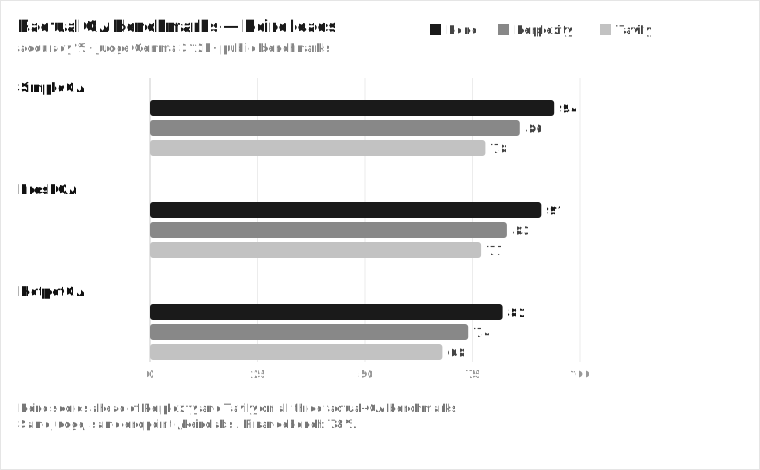
On three public QA benchmarks (judge: Gemma 3 12B), Keiro leads Perplexity and Tavily:
The protocol is plumbing. The retrieval is the product. Swap the search backend behind the same MCP server and the agent's answers move with these numbers.
- **SimpleQA:** Keiro 94, Perplexity 86, Tavily 78
- **FreshQA:** Keiro 91, Perplexity 83, Tavily 77
- **HotpotQA:** Keiro 82, Perplexity 74, Tavily 68
- **FinanceBench:** 78%
If you swap the search backend behind the same MCP server, the agent's answers move with these numbers. The protocol is the plumbing. The retrieval is the product. This is the part competitors cannot copy by writing a nicer MCP server, because the index and the ranker are years of work, not a weekend.
## Takeaways
MCP turns a web-search integration from a per-framework chore into a write-once server that runs in every MCP client, with the API key safely server-side and the context budget under your control. The 2026-07-28 spec makes those servers stateless and horizontally scalable, so for the first time an MCP server deploys like a normal HTTP service.
Build the server with five tools (`web_search`, `search_content`, `answer`, `deep_research`, `extract_url`), write descriptions that tell the model when not to call each one, validate args inside the function, return errors as dicts, and lean on `search_content` with embeddings for RAG. Test it in the MCP Inspector before Claude Desktop, log to stderr, and keep the active toolset lean.
Get a Keiro API key (500 credits a month free, no card) on the [pricing page](/pricing), drop the server above into Claude Desktop, and you have a benchmark-leading web-search tool in every MCP client you use. For the broader landscape, see the [best AI search API guide](/best-ai-search-api) and the [Exa alternatives breakdown](/firecrawl-alternative).
## FAQ
### Is MCP the same as function calling / tool use?
No. Function calling is a model capability (the model emits structured arguments). MCP is a protocol for the server that implements those functions. With MCP, you write the tool once as a server, and any MCP-compatible client (Claude Desktop, Cursor, the Claude API connector) can call it, instead of re-implementing the same tool in every framework's tool format. Function calling is how the model asks. MCP is how the server answers.
### stdio or Streamable HTTP?
stdio for a local server used by one client (Claude Desktop, Cursor, an IDE). No network, no auth, the host spawns it as a child process. Streamable HTTP for a remote server or many clients, and for the Claude API MCP connector. As of the 2026-07-28 spec, Streamable HTTP is stateless, so you can load-balance it like any HTTP service. Avoid HTTP+SSE; it is deprecated.
### How do I keep the API key safe?
Put it in an env var on the server process and read it with `os.environ.get`. Never hardcode it, never log it, and never return it in a tool result. The MCP model puts the key server-side by design. The model only ever sees tool inputs and outputs, not the credentials.
### How do I stop one search call from blowing the context window?
Bound `max_results` (default 10 for search, 3 to 5 for content extraction), return markdown or JSON instead of raw HTML, and use `defer_loading` on the Claude API so rarely-used tools do not load their definitions every request. For RAG, `search_content` with `with_embeddings=true` returns chunked text plus embeddings, so you get retrieval and indexing material in one call instead of fetching 50 pages.
### What changes for me in the 2026-07-28 spec?
Your v1.x server keeps working. When you move to the new SDKs, you get a stateless server that scales behind a round-robin load balancer, required `Mcp-Method`/`Mcp-Name` routing headers, `ttlMs`/`cacheScope` caching on list and resource-read results, Multi Round-Trip Requests instead of held-open streams, full JSON Schema 2020-12 for tools, and OAuth 2.1 Resource Server auth with RFC 8707. Migrate when the stable SDKs land (July 27 to 28, 2026), not on the prerelease.
### Python FastMCP or MCPServer, which do I use?
`FastMCP` (v1.x) is the stable, production line today; `pip install mcp` resolves to it. `MCPServer` (v2) is the rename, in beta until July 27 to 28, 2026; opt in with `pip install mcp==2.0.0b1`. The tool decorators and bodies move across almost unchanged; the breaking changes are the import path, snake_case field names, the standalone `mcp-types` package, and the removed WebSocket transport. If you ship today, use v1.x. If you want 2026-07-28 stateless on day one, pin the v2 beta and run the codemod when stable lands.
### How do I test an MCP server?
Run it in a terminal (`mcp run` or `fastmcp dev`) and use the MCP Inspector (`npx @modelcontextprotocol/inspector`, v0.14.1 or later) to call tools manually and watch the JSON-RPC traffic. That catches almost everything before you wire it into Claude Desktop. For the model's tool choice, give the agent a simple query and check it picked the cheap tool, not `deep_research`. If it picked wrong, fix the descriptions.
### What does a Keiro MCP search call cost?
`web_search` is 1 credit (~$0.001 at the Startup plan's $1/1k), `search_content` is 3, `answer` is 5, `extract_url` is 3, `deep_research` is 20. The free tier is 500 credits a month. So on free you get 500 basic searches, or about 166 RAG `search_content` calls, or 25 deep-research runs a month. The model picking the right tool is the difference between burning 1 credit and 20 on the same question.
### Can I run multiple search providers as MCP servers at once?
Yes, and Claude will pick per query. Configure them as separate entries in `mcpServers` (Claude Desktop) or multiple `mcp-client` tools (API). Keep the list lean, because every server's tool definitions load into context. A common pattern is one primary (Keiro for QA and RAG) and one specialist (Exa for keyword-free "find similar"), not five overlapping search servers.
### How does MRTR change a long extraction?
Before 2026-07-28, a long interactive tool call held an SSE stream open, which is fragile and ties up a connection. With MRTR, the server returns an `InputRequiredResult` when it needs a clarifying answer, and the client re-issues the original call with `inputResponses` and echoed `requestState`. Server-initiated requests may only happen while the server is already processing a client request. For a search tool, this is how you ask "which of these three pages should I read deeper?" without holding a stream open for minutes.