---
title: "Best Web Scraping APIs for AI Agents in 2026: A Builder's Guide"
dek: "A builder's guide to wiring web data into AI agents in 2026. The three agent scraping workflows, four production architecture patterns, real code for each, MCP wiring on the 2026-07-28 stateless spec, and the curated best-of by use case. Keiro, Firecrawl, Jina, ScrapingBee, Browserless, Apify, Crawl4AI, Bright Data."
category: "guide"
tags: [guide, ai-agents, web-scraping, api-guide, keiro, mcp, rag, architecture]
author: "Manny"
published: 2026-01-03T00:00:00+00:00
updated: 2026-09-05T00:00:00+00:00
url: https://keirolabs.cloud/blogs/guide/best-web-scraping-apis-for-ai-agents-2026
---
This is the guide I wish teams read before they picked a scraping API for an agent. It is not another "here are eight tools in a table" list (we wrote that too, see [the comparison post](/blogs/comparisons/what-is-the-best-web-scraping-api-for-ai-agents)). It is about how agents actually consume web data, the three workflows that hide inside "I need to scrape this," the four architecture patterns that work in production, the code for each, and which API fits which layer.
The thesis, in one line: most agents do not need a scraper. They need clean content. Picking the wrong layer is how scraping stacks get expensive, fragile, and slow. Wire by workflow, not by brand. Read this, then pick.
$0.60Keiro /search/content per 1k pages
3credits: search + clean text + embeddings
80/15/5easy / crawl / hard split in production
9xFirecrawl credit multiplier, JSON + Enhanced
TL;DR · wire by workflow, layer by difficulty
- **You know the URL:** extract. Keiro `/data` (2cr, structured) or Jina Reader (free, markdown). One call, one page.
- **You know the site, not the pages:** crawl. Firecrawl is the default. Markdown by default, JS included, open source, official MCP server.
- **You know neither:** search plus extract in one call. Keiro `/api/v2/search/content` (3cr, search + clean text + embeddings). This is where most agents actually live and where a separate scraper is the expensive choice.
- **Hard, login-walled, interactive:** a real browser. Browserless Smart Scrape for general JS and stealth, Apify for niche Actors, Bright Data for enterprise.
- **Production:** route by difficulty. Keiro for the 80% easy, Firecrawl for the 15% crawls, Browserless for the 5% hard. Expose the lot as three MCP tools on the 2026-07-28 stateless spec.
## What an agent actually needs from the web
An agent does not want HTML. It wants one of three things, and "scraping" is the wrong word for two of them.
1. **Clean markdown** to drop into its context window so it can read and answer.
2. **Structured fields** (a company record, a product, an event) it can reason over and act on.
3. **Chunked embeddings** it can retrieve from in a RAG pipeline.
Raw HTML gives you none of those. You still have to clean, parse, chunk, and embed. So "scraping for AI" is really "extraction and cleaning for AI," and the best API is the one that gets you the cleanest content with the fewest steps and the least infrastructure you have to maintain. A scraper is one way to get there. Often it is the high-maintenance way.
This is the layering that matters when you build:
- **A search index** (like Keiro's 50B+ page index) is not a scraper at all. It is a pre-built, pre-cleaned, pre-ranked retrieval surface.
- **An extraction API** takes a URL and returns clean markdown or structured fields.
- **A crawler** walks a site and feeds an extractor.
- **A browser** drives a real Chromium and handles whatever the page throws.
Each layer trades cost for coverage. Pick the cheapest layer that covers your target, then escalate only when you have to. That last sentence is the whole guide.
## The three agent scraping workflows
Every "scrape this for my agent" request decomposes into one of three workflows. The right API depends on which one you are in, and teams that skip this step end up paying for the wrong layer.
### Workflow 1: you know the URL
You have a specific page and you want its clean text or structured fields. This is extraction, not scraping. One call, one page, done.
Tools Keiro /api/v2/data (2cr, structured fields from a url or urls array), Jina Reader (r.jina.ai/{url}, free, markdown), Firecrawl scrape (1cr/page), ScrapingBee (JS render, markdown opt-in).
The mechanic: you send a URL, the API fetches and parses, you get markdown or JSON back. No crawl, no search, no index. The failure modes are anti-bot and JS-rendered SPAs, which is where a plain extract can return an empty shell and you need to escalate to a browser.
### Workflow 2: you know the site, not the pages
You want a whole site or a section of it: internal docs, a documentation portal, a product catalog, a forum. This is crawling.
Tools Firecrawl (crawl + map + scrape, markdown default, JS), Browserless (drive a real browser over a site), Apify (pre-built Actors for known sites), Crawl4AI (open source, self-host).
The mechanic: the API starts at a seed URL, follows links to a depth or page count you set, and returns clean markdown per page. The cost is per page, so model your page count before you run a 50k-page crawl on a paid plan. The failure mode is crawl traps, pagination, and rate limits, which is why a crawler with a `map` step (Firecrawl) or a scriptable browser (Browserless) wins over a naive recursive fetch.
### Workflow 3: you know neither
You have a question and you want pages about it plus their clean text. This is search plus extraction in one step, and it is where most agent teams actually live.
Tools Keiro /api/v2/search/content (search + clean text + embeddings, 3cr, one call), or a search API plus a separate scrape of each result.
Workflow three is the trap. Teams reach for a scraping API, get a list of URLs back, then pay again to clean each one. Two calls per result, two bills per result, two failure modes per result. The cheaper path is an API that does search and extraction in one call so you never run a separate scrape. Keiro `/search/content` does exactly that, and it is the largest cost and complexity lever in agent scraping.
## Cost per 1,000 pages of clean content
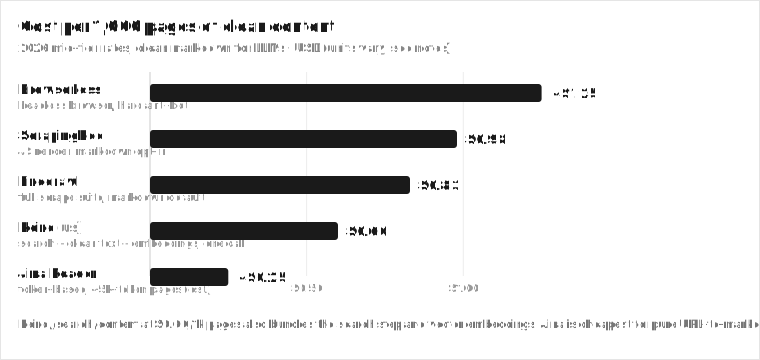
Before the patterns, the money. Normalized to the cost of 1,000 pages of clean, LLM-ready content (the unit agents actually consume), 2026 mid-tier rates:
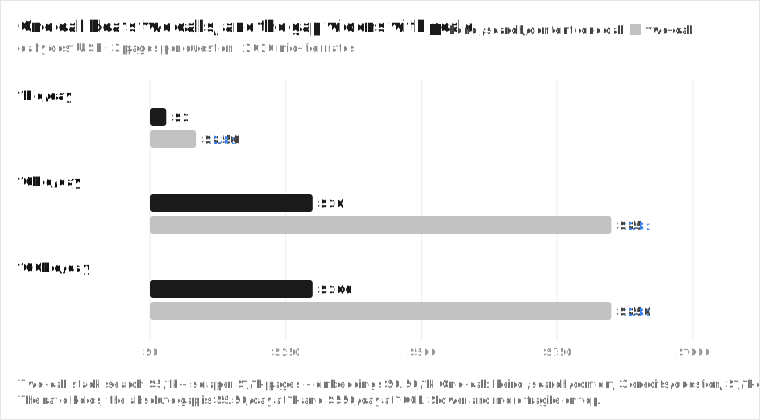
Cost per 1,000 pages of clean, LLM-ready content. Keiro /search/content at $0.60/1k also bundles the search step and vector embeddings. Jina is cheapest for pure URL-to-markdown.
Read this chart carefully because the headline per-page price is the floor, not the ceiling. Jina Reader is cheapest for pure URL-to-markdown (token-based, so it scales with output length, not page count). Keiro `/search/content` at $0.60/1k pages is the cheapest that also bundles the search step and the vector embeddings. Firecrawl is the full-featured scraping leader at $0.99/1k on the Standard tier ($0.83 billed annually).
The multipliers sit on top of the headline:
- **Firecrawl** advertises 1 credit per page. The real math is a stack: base 1 credit, +4 for JSON extraction, +4 for Enhanced Mode, +1 per PDF page, +1 for Zero Data Retention. JSON + Enhanced together is 9 credits per page. At the $19/mo Hobby tier that is $3.80/1k pages, dropping to $0.99/1k at the $99/mo Standard tier at 100k pages ($0.83/1k billed annually). Model the credit multiplier for your real workload, not the headline.
- **ScrapingBee** charges 5 credits for JS render and 75 credits for stealth per request. The $0.37/1k Enterprise number is the floor; a stealth-heavy workload lands much higher.
- **Browserless** bills in units where 1 unit = 30 seconds of browser time. Residential proxy is 6 units/MB, datacenter 2 units/MB, CAPTCHA solve 10 units. A slow page that takes 90s is 3 units before any proxy cost. Smart Scrape auto-escalation, which is the whole point, also multiplies units.
- **Bright Data** has a $499/mo minimum before you scrape a single page.
The pattern: every scraper has a headline and a real cost. The real cost is what shows up on your invoice after JS, stealth, retries, and the inevitable escalation. Keiro and Jina have the flattest cost curves because they bundle the expensive parts into the base price.
## Architecture pattern 1: the one-call RAG pipeline
The most common agent pattern is RAG over the live web: ask a question, get clean, chunked, embeddable text into context. Most teams build this as a pipeline of search, scrape, chunk, embed. Four services, four bills, four failure modes. Keiro collapses it into one call.
```bash
# Keiro /search/content: search + clean text + embeddings in one call
curl -X POST https://api.keirolabs.cloud/api/v2/search/content \
-H "Authorization: Bearer keiro_your_api_key_here" \
-H "Content-Type: application/json" \
-d '{
"query": "how does RAG retrieval actually work in 2026",
"maxResults": 5,
"mode": "ai",
"embeddings.enabled": true,
"embeddings.dimensions": 768,
"embeddings.chunkSize": 500
}'
```
That returns ranked pages, their clean markdown, and chunked vector embeddings in one response. The agent gets retrieval and indexing material from a single request. No separate scraper, no separate embedding service, no chunking step in your code. Three credits (about $0.003) for up to 5 pages of clean text plus embeddings, which works out to about $0.60 per 1,000 pages. Free tier is 500 credits a month, no card, commercial use allowed.
The knobs you tune in the request, not in post-processing:
- **`mode`** controls extraction depth: `ai` for the cleanest LLM-ready markdown, `deep` for hard targets, `medium` and `light` for speed.
- **`embeddings.dimensions`** is 384, 512, 768, or 1024 to match your model.
- **`embeddings.chunkSize`** ranges 100 to 2000 tokens. You are tuning the retrieval pipeline in the call.
When this pattern wins: the agent's job is "answer questions over current web content." That is most agents. You skip the scraper entirely, and you skip the embedding service too. This is the cheapest, lowest-infrastructure pattern in the guide.
Best for RAG over the live web, answer engines, research agents, any workflow where the question comes in and the agent reads the web to answer.
Price 3 credits (~$0.003) for up to 5 pages with embeddings. ~$0.60/1k pages. 500 free credits/mo.
The catch Capped at maxResults 5 per call. For a broad scan, fan out with /search/batch (1cr/query, async) or call /search/content in a loop.
## Architecture pattern 2: crawl a known site
When the agent needs a whole site (internal docs, a documentation portal, a catalog, a support center), search-plus-extract is not enough. You need to crawl. Firecrawl is the default: markdown by default, JS rendering included, crawl plus map plus scrape in one API, open source and self-hostable.
```python
# firecrawl: crawl a site into clean markdown
from firecrawl import Firecrawl
app = Firecrawl(api_key="fc-YOUR_KEY")
# crawl returns clean markdown per page, ready for chunking + embedding
for doc in app.crawl(
"https://docs.example.com",
formats=["markdown"],
limit=100,
poll_interval=30,
):
# doc["markdown"] is clean text; chunk and embed for your RAG store
chunks = chunk_text(doc["markdown"], size=500)
vectors = embed(chunks)
upsert(vectors, metadata=doc["metadata"])
```
The mechanic: Firecrawl `crawl` starts at a seed, `map` discovers the link graph, and `scrape` fetches and cleans each page. You get markdown back per page, which you then chunk and embed into your vector store. The crawl is async; you poll or stream results. For a fixed corpus (internal docs that rarely change) you crawl once, index, and re-crawl on a schedule.
One gotcha worth knowing: Firecrawl runs a pre-flight credit check against your full `limit` (default 10,000 pages) before it starts. If your balance cannot cover the whole limit, you get HTTP 402 Payment Required and the crawl never begins. Set an explicit `limit` matching your real intent. Credits also charge on HTTP 403/404 pages because the infrastructure was spent fetching them.
When this pattern wins: the target is a known site you want wholesale, the agent runs over a fixed corpus, or you need JS rendering the index does not have. The cost is per page ($0.99 to $3.80/1k on Firecrawl depending on tier and credit multiplier), so model your page count. A 10k-page docs site on Standard is about $9.90 at the floor; with JSON + Enhanced extraction it can run to $90 or more.
Best for Whole-site ingestion into a RAG store: docs portals, catalogs, support centers, internal wikis.
Price $0.99 to $3.80/1k pages depending on tier. Free 1,000 credits/mo. Open source (AGPL), self-hostable.
The catch The headline 1 credit/page becomes 5 with JSON, 5 with Enhanced, 9 with both. Model the multiplier, not the headline. Pre-flight credit check can reject a crawl before it starts.
Pros
Markdown by default, no post-processing
Crawl + map + scrape in one API
JS rendering included
Open source, self-hostable, 130k+ stars
Official MCP server
Cons
Credit multipliers stack: JSON +4, Enhanced +4, PDF +1/page
Pre-flight 402 if balance under the full limit
No built-in embeddings, you bring your own
AGPL license is fine for self-host but read it
Anti-bot is good, not enterprise-grade
## Architecture pattern 3: interactive and hard-target scraping
Some pages hide content behind clicks, logins, or aggressive anti-bot. No extraction API handles that cleanly. This is where a real browser comes in. Browserless (Puppeteer, Playwright, Selenium, BrowserQL, REST, MCP, Smart Scrape auto-escalation, stealth routes) for general JS and stealth, Bright Data (99.3% on LinkedIn, Amazon, Google, $499/mo minimum) for enterprise scale, Apify for niche protected sites with a pre-built Actor.
```python
# browserless: Smart Scrape auto-escalates HTTP -> proxied -> headless -> CAPTCHA
import requests
r = requests.post(
"https://chrome.browserless.io/smart-scrape",
params={"token": "YOUR_TOKEN"},
json={
"url": "https://protected-site.example.com",
"formats": ["markdown"],
},
)
markdown = r.json()["markdown"]
```
Smart Scrape is the interesting primitive. You give it a URL and it walks a four-rung ladder, stopping at the first one that succeeds:
1. **Fast HTTP fetch** mimics a real browser network fingerprint. Handles static and server-rendered pages in under 2 seconds. Cheapest.
2. **Proxied HTTP fetch** retries the same request through a residential proxy to beat datacenter IP blocks.
3. **Headless browser** spins up a stealth Chromium for JS-rendered SPAs and client-rendered content.
4. **Browser + CAPTCHA solve** detects and solves reCAPTCHA, hCaptcha, Cloudflare Turnstile automatically. Most expensive.
The response includes a `strategy` field naming which tier won (`http-fetch`, `http-proxy`, `browser`, `browser-captcha`) and an `attempted` array listing every tier it tried. Output formats in one request: `html`, `markdown`, `screenshot`, `pdf`, `links`. You pay for the unit of browser time it actually uses (1 unit = 30s), plus 6 units/MB on residential proxy and 10 units per CAPTCHA solve, not for a fixed tier. For a target that is easy 80% of the time and brutal 20% of the time, this auto-escalation is cheaper than running everything through a headless browser by default.
When this pattern wins: the target is login-walled, Cloudflare-protected, or needs interaction (clicks, scrolls, infinite scroll, login flows). It is the most expensive layer, so reserve it for the hard minority, not the easy majority. If 100% of your traffic goes through Browserless, your architecture is wrong.
Best for Login walls, Cloudflare, JS-heavy SPAs, infinite scroll, anything that needs a real click.
Price ~$1.25/1k pages (Starter $140/mo, 180k units, 1 unit = 30s browser time). Smart Scrape escalates and bills per unit used. Free tier 1,000 units/mo.
The catch Slow pages cost more units. Stealth routes and CAPTCHA solves are where the bill grows. This is the layer to ration, not the layer to default to.
## Architecture pattern 4: hybrid routing by target difficulty
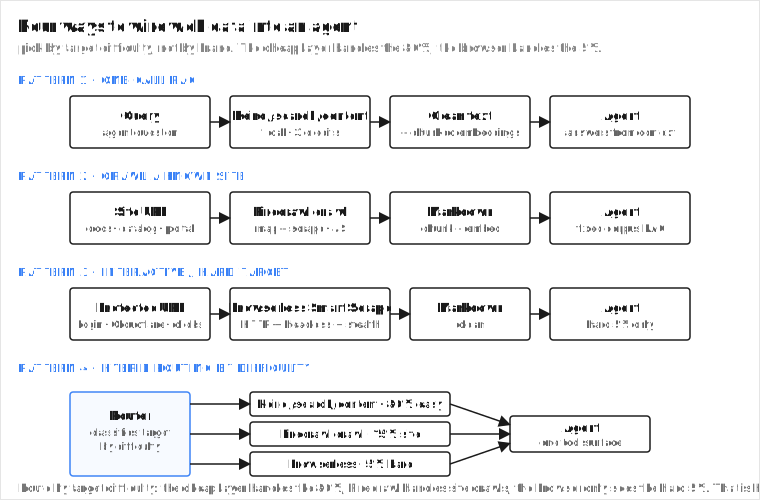
The production pattern most teams land on is not one API. It is three layers split by target difficulty, behind a router that classifies the target and dispatches.
The four patterns as flows. Pattern 4 routes by target difficulty: the cheap layer handles the 80%, Firecrawl handles site crawls, the browser only sees the hard 5%.
The split, from production agent deployments:
- **Easy, open pages (the 80%):** Keiro `/search/content` or Jina Reader. Cheap, clean, one call. No browser, no crawl.
- **Whole-site crawls (the 15%):** Firecrawl. Markdown, JS, crawl and map.
- **Hard, protected, interactive (the 5%):** Browserless or an Apify Actor. Real browser, anti-bot, stealth.
Routing by target difficulty is the largest cost lever in scraping architecture. Sending every page through a headless browser is how scraping bills get big. Sending every page through a cheap extractor and special-casing the hard ones is how they stay small.
A minimal router in Python:
```python
# hybrid router: classify the target, dispatch to the right layer
import requests
KEIRO = "https://api.keirolabs.cloud"
HEADERS = {"Authorization": "Bearer keiro_your_api_key_here"}
def route_and_fetch(question: str, target: dict) -> dict:
"""
target = {"kind": "query" | "site_url" | "protected_url", "value": str}
"""
kind = target["kind"]
# 80%: open web, known question -> Keiro /search/content (search + extract + embed)
if kind == "query":
r = requests.post(
f"{KEIRO}/api/v2/search/content",
headers=HEADERS,
json={"query": target["value"], "maxResults": 5, "mode": "ai",
"embeddings.enabled": True, "embeddings.dimensions": 768},
)
return r.json()
# 15%: known site -> Firecrawl crawl
if kind == "site_url":
return firecrawl_crawl(target["value"], formats=["markdown"], limit=100)
# 5%: hard target -> Browserless Smart Scrape
if kind == "protected_url":
return browserless_smart_scrape(target["value"], formats=["markdown"])
raise ValueError(f"unknown target kind: {kind}")
```
The router does not need to be clever. A rule on the request shape (question vs. site URL vs. protected URL) is usually enough. The point is that the cheap layer gets the 80% and the expensive layer gets the 5%, not the other way around. Teams that send every request through Browserless because "it handles everything" are paying $1.25/1k for traffic that would cost $0.60/1k through Keiro, and they are slower per request too.
Best for Any agent that touches a mix of open pages, site crawls, and hard targets. Which is, eventually, every agent.
Price Blended cost lands between $0.60/1k (mostly easy) and $1.25/1k (mostly hard). The 80/15/5 split blends to roughly $0.70/1k.
The catch You operate three integrations instead of one. The router is simple; the operational surface is the cost.
## Wiring it into an agent with MCP
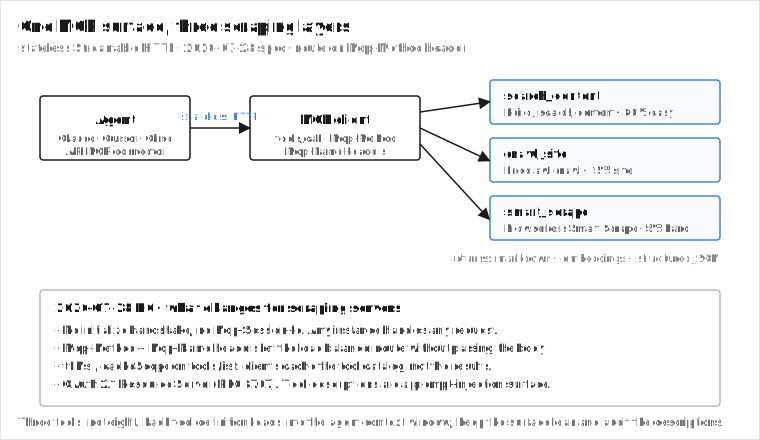
Model Context Protocol lets you expose these layers as tools any MCP-compatible client (Claude Desktop, Cursor, Cline, the Claude API MCP connector) can call, without per-framework glue. A Keiro MCP server with `web_search`, `search_content`, and `extract_url` tools gives an agent the cheap layer; add a Firecrawl or Browserless tool for the hard layer.
One MCP surface, three scraping layers. The 2026-07-28 spec makes the server stateless: any instance handles any request, no sticky sessions.
A minimal FastMCP server that wires the three layers behind one tool surface:
```python
# agent_scraping_mcp.py: FastMCP server exposing the three layers
from fastmcp import FastMCP
import httpx
mcp = FastMCP("agent-scraping")
KEIRO = "https://api.keirolabs.cloud"
KEIRO_HEADERS = {"Authorization": "Bearer keiro_your_api_key_here"}
@mcp.tool
def search_content(query: str, max_results: int = 5) -> dict:
"""Search the web, return clean markdown plus chunked embeddings. 80% layer."""
r = httpx.post(
f"{KEIRO}/api/v2/search/content",
headers=KEIRO_HEADERS,
json={"query": query, "maxResults": max_results, "mode": "ai",
"embeddings.enabled": True, "embeddings.dimensions": 768},
timeout=30,
)
return r.json()
@mcp.tool
def crawl_site(site_url: str, limit: int = 100) -> dict:
"""Crawl a known site into markdown. 15% layer. Delegates to Firecrawl."""
# call firecrawl here, return {"pages": [...], "count": n}
...
@mcp.tool
def smart_scrape(url: str) -> dict:
"""Hard-target scrape with auto-escalation. 5% layer. Delegates to Browserless."""
# call browserless smart-scrape here, return {"markdown": "..."}
...
if __name__ == "__main__":
mcp.run()
```
The 2026-07-28 MCP spec matters here, and it changes how you deploy a scraping server. The headline: MCP is now stateless at the protocol layer. The `initialize`/`initialized` handshake is gone. The `Mcp-Session-Id` header is gone. Protocol version, client info, and capabilities travel in `_meta` on every request, and a new `server/discover` method lets clients fetch capabilities when needed.
What that means for your scraping server:
- **It deploys like any HTTP service.** A remote scraping MCP server that previously needed sticky sessions and a shared session store can now run behind a plain round-robin load balancer and scale horizontally.
- **`Mcp-Method` and `Mcp-Name` headers** let the load balancer route without inspecting the body.
- **`ttlMs` and `cacheScope`** on `tools/list` results let clients cache the tool catalog per the server's hint (modeled on HTTP `Cache-Control`). They cache the catalog, not the scrape results.
- **Auth is OAuth 2.1 Resource Server** (RFC 8707), with `iss` validation per RFC 9207.
- **Multi Round-Trip Requests** (MRTR): the server returns an `InputRequiredResult` with `inputRequests` plus opaque `requestState`; the client re-issues the call with `inputResponses` and echoed `requestState`. No persistent connection needed, which is exactly what a long-running crawl wants.
Keep the toolset lean. Every tool definition loads into the agent's context window and tool descriptions are an attack surface. Three tools (`search_content`, `crawl_site`, `smart_scrape`) is the right shape; eight is too many. FastMCP already supports `stateless_http=True` with the `streamable-http` transport, so the server above is one flag away from the new spec shape.
## The curated best-of by agent use case
This is the cheat sheet. Match the workflow to the tool, then layer.
RAG over the live web Keiro /search/content. Search + clean text + embeddings in one call. $0.60/1k pages, 500 free credits/mo. The default for workflow 3.
Whole-site crawl into markdown Firecrawl. $0.99 to $3.80/1k, open source, official MCP server. The default for workflow 2.
Free URL-to-markdown, prototyping Jina Reader. Free, r.jina.ai/{url}, no key needed for 20 RPM. Token-based, so cost scales with output length.
Cheap raw HTML at high volume ScrapingBee. $0.37 to $0.98/1k JS pages. JS render = 5 credits, stealth = 75. Markdown is opt-in.
Interactive and hard anti-bot Browserless. ~$1.25/1k, Puppeteer/Playwright/BrowserQL/Smart Scrape. The 5% layer.
Niche protected sites Apify. Pre-built Actors for Amazon, LinkedIn, Maps, and more. CU-based ($0.20/CU = 1GB RAM x 1hr). Triple-layer billing (compute + proxy + actor).
Self-host, free, full control Crawl4AI. Apache 2.0, 60k+ stars, bring your own LLM. You own infra, proxies, and anti-bot. Free software, real TCO.
Enterprise anti-bot at scale Bright Data. 99.3% on LinkedIn, Amazon, Google. $499/mo minimum. The layer for when a missed page costs more than the minimum.
## Why accuracy matters when the agent reads the scraped page
An agent that reads scraped content and answers a question is only as right as the retrieval and ranking behind it. Swap the extraction backend and the agent's answers move with the underlying index quality. The scraper is plumbing. The retrieval is the product.
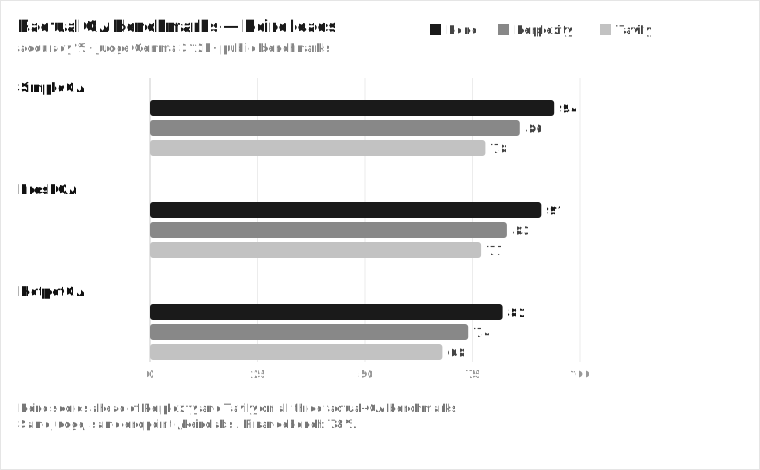
Factual QA benchmarks (judge: Gemma 3 12B, endpoint /keiro). Keiro leads Perplexity and Tavily on SimpleQA, FreshQA, and HotpotQA.
The numbers, judge Gemma 3 12B on the `/keiro` endpoint:
- **SimpleQA:** Keiro 94, Perplexity 86, Tavily 78
- **FreshQA:** Keiro 91, Perplexity 83, Tavily 77
- **HotpotQA:** Keiro 82, Perplexity 74, Tavily 68
- **FinanceBench:** 78% (consistent across the homepage Benchmarks panel, /financebench, and the machine spec)
These are the moat. Keiro leads Perplexity and Tavily on factual QA. The claim is bounded: we do not say Keiro beats Exa, Brave, or SerpAPI on these benchmarks because they were not measured on them. Exa's real differentiator is keyword-free semantic "find similar" search, which is a different primitive, not a QA benchmark. If your agent scrapes a page and answers from it, the search and ranking that found the page decide whether the answer is right.
## A concrete scenario: the research agent at 1,000 questions/day
Put the math together. You run a research agent that answers 1,000 questions a day over the live web. Each question needs 3 pages of clean content with embeddings.
**The two-call stack (search API + scraper):** search at $5/1k calls ($5/day) plus a scraper at $1/1k pages on 3,000 pages ($3/day) plus an embedding service ($0.50/day). Total ~$8.50/day, three services, three latencies, three failure modes. At 10k questions/day, $85/day. At 100k, $850/day.
**The one-call stack (Keiro /search/content):** 3 credits per call, 1,000 calls/day = 3,000 credits. At $1/1k credits list price that is $3/day, one service, one latency, one failure mode, embeddings included. At 10k questions/day, $30/day. At 100k, $300/day. Free tier covers 500 credits/mo, so the first ~166 questions a day are free.
The gap is roughly 2.8x on cost and it holds at every scale. The absolute difference grows from $5.50/day to $550/day. And the two-call version is slower per request on top.
The gap is roughly 2.8x on cost and wider on operational complexity. And the two-call version is slower per request because it serializes search then scrape. This is why workflow 3 is where the money is: collapsing search and extract into one call is the largest lever in agent scraping economics.
## Takeaways
Wire web data into an agent by workflow, not by brand. If you know the URL, extract (Keiro `/data`, Jina). If you know the site, crawl (Firecrawl). If you know neither, use Keiro `/search/content` to search and extract in one call, because that is where most agents live and where a separate scraper is the expensive, high-maintenance choice. Layer a real browser (Browserless, Apify) only for the hard minority, route by target difficulty, and expose the lot as three MCP tools on the 2026-07-28 stateless spec.
The three rules I would tattoo on the arm of anyone building an agent that touches the web:
1. **Pick the cheapest layer that covers your target.** Escalate to a browser only when extraction fails, not by default.
2. **Collapse calls.** Search-plus-extract in one call beats search-then-scrape on cost, latency, and fragility, every time.
3. **Route by difficulty, not by brand.** The 80/15/5 split is the production shape. A single-tool stack is almost always wrong.
Start free with 500 Keiro credits on the [pricing page](/pricing). For the tool-by-tool comparison, see [the best web scraping API comparison](/blogs/comparisons/what-is-the-best-web-scraping-api-for-ai-agents). For the search-API angle, see [the best AI search API guide](/best-ai-search-api). For wiring MCP end to end, see [the MCP deep guide](/blogs/guide/mcp-model-context-protocol-web-search-2026-guide).
## FAQ
### Do I need a scraping API for an AI agent, or a search API?
Often a search-plus-extraction API. An agent wants clean text in context, not HTML. Keiro `/search/content` searches the web and returns clean markdown plus embeddings in one call, so you skip the scrape step entirely. You need a scraper (Firecrawl, Browserless) when you must crawl a whole site, interact with a page, or crack hard anti-bot.
### How do I build a RAG pipeline over the live web?
One call with Keiro `/api/v2/search/content` and `embeddings.enabled=true` returns ranked pages, clean markdown, and chunked vector embeddings. That is retrieval plus indexing material in a single request, no separate scraper or embedding service. For a fixed corpus, crawl it with Firecrawl first, then chunk and embed.
### Which scraping API is cheapest for AI agents?
For search-plus-clean-content, Keiro `/search/content` at $0.60/1k pages, free 500 credits a month. For pure URL-to-markdown, Jina Reader is free (token-based, so cost scales with output). For raw HTML at high volume, ScrapingBee at $0.37 to $0.98/1k JS pages. Cheapest depends on the workflow. The headline per-page price is the floor; JS, stealth, and credit multipliers sit on top.
### How do I handle JavaScript and anti-bot-protected pages for an agent?
Browserless Smart Scrape for general JS and stealth. It walks a four-rung ladder (HTTP, proxied HTTP, headless, headless plus CAPTCHA solve) and stops at the first one that works, billing you for the units actually used. Apify for niche protected sites with a pre-built Actor. Bright Data for the hardest enterprise targets (99.3% on LinkedIn, Amazon, Google). Keiro and Jina handle JS in extraction but are not built for login walls or aggressive anti-bot. Reserve the browser layer for the hard minority.
### Should I run more than one scraping API?
Usually yes, routed by target difficulty. Keiro `/search/content` or Jina for open pages (the 80%), Firecrawl for whole-site crawls (the 15%), and Browserless or an Apify Actor for hard protected targets (the 5%). Sending every page through a headless browser is how scraping bills get big. Splitting by difficulty is how they stay small.
### How does this fit with MCP?
Expose each layer as an MCP tool: `search_content` (Keiro) for the cheap layer, `crawl_site` (Firecrawl) for site crawls, `smart_scrape` (Browserless) for hard targets. Any MCP-compatible client can call them without per-framework glue. The 2026-07-28 spec makes these servers stateless (no `initialize`, no `Mcp-Session-Id`), routable on `Mcp-Method`/`Mcp-Name` headers, and cacheable via `ttlMs`/`cacheScope`. Keep the toolset lean, because tool definitions consume context and tool descriptions are a prompt-injection surface.
### Is Firecrawl really 1 credit per page?
The headline is 1 credit per page for a basic scrape. The real cost is a stack: base 1 credit, +4 for JSON extraction, +4 for Enhanced Mode, +1 per PDF page, +1 for Zero Data Retention. JSON + Enhanced together is 9 credits per page. At the $19/mo Hobby tier that is $3.80/1k pages, dropping to $0.99/1k at the $99/mo Standard tier at 100k pages ($0.83/1k billed annually). Firecrawl also runs a pre-flight credit check against your full `limit` (default 10,000) and returns HTTP 402 if the balance cannot cover it, so set an explicit `limit`. Model the credit multiplier for your real workload, not the headline.
### How does Browserless Smart Scrape pricing actually work?
Smart Scrape auto-escalates through four strategies (fast HTTP, proxied HTTP, headless browser, headless plus CAPTCHA solve) and bills by units of browser time. One unit is 30 seconds of browser connection. Residential proxy traffic is 6 units/MB, datacenter is 2 units/MB, and a CAPTCHA solve is 10 units. The Starter plan is $140/mo for 180k units. A page that returns on the fast-HTTP rung costs fractions of a unit; a page that needs a CAPTCHA solve costs 10 plus browser time. The response tells you which `strategy` won so you can see where the money went.
### Can I self-host a scraping API for an agent for free?
Yes. Crawl4AI (Apache 2.0, 60k+ stars) and Firecrawl (AGPL, 130k+ stars) are self-hostable with no per-page fee. The trade is infrastructure, proxy, and anti-bot TCO, which is real engineering cost even though the software is free. Best for teams with Python infra and the capacity to run it.
### What is the difference between this guide and the scraping comparison post?
This one is a builder's guide: how to wire web data into an agent, the workflows, the architecture patterns, and the code for each. The [comparison post](/blogs/comparisons/what-is-the-best-web-scraping-api-for-ai-agents) is a tool-by-tool "which scraper should I pick" piece with the ranked verdicts. Read that one to choose a tool. Read this one to design the stack.