---
title: "What Is the Best Web Scraping API for AI Agents in 2026?"
dek: "Most teams asking for a scraping API do not need a scraper. They need clean content in their agent. A real comparison of Keiro, Firecrawl, Jina Reader, ScrapingBee, Browserless, Apify, Crawl4AI, and Bright Data for AI workflows, with the three workflows that decide which one you actually need, the anti-bot cost ladder, and the credit math that burns teams."
category: "comparisons"
tags: [web-scraping, comparison, agents, api, ai-agents, keiro]
author: "Manny"
published: 2026-09-28T08:45:00+00:00
updated: 2026-09-05T00:00:00+00:00
url: https://keirolabs.cloud/blogs/comparisons/what-is-the-best-web-scraping-api-for-ai-agents
---
$0.60Keiro / 1k clean pages
9Firecrawl credits, JSON + Enhanced
8tools compared
4anti-bot tiers on the ladder
TL;DR · the eight that matter, by category
- **Clean content into RAG without a scraper:** Keiro. `/search/content` returns ranked pages plus clean markdown plus vector embeddings in one call, ~$0.48/1k pages (Startup tier), free 1,250 credits a month (12,500 lite searches).
- **Full scraping suite for AI:** Firecrawl. Scrape, crawl, map, search, extract, interact. Markdown by default. Open source (AGPL, 130k+ stars) with an official MCP server. Watch the credit multipliers.
- **Free URL-to-markdown:** Jina Reader. Prefix `r.jina.ai/` to any URL, get markdown. Free, no key, 20 RPM.
- **Cheap raw HTML at scale:** ScrapingBee. ~$0.37 to $0.98/1k JS pages, residential and stealth anti-bot.
- **Hard anti-bot and interactive automation:** Browserless. Puppeteer, Playwright, BrowserQL, Smart Scrape 4-tier cascade, ~$1.25/1k pages.
- **Niche protected sites (Amazon, LinkedIn, Maps):** Apify. Pre-built Actors, pay-per-event billing, triple-layer cost.
- **Open-source self-host, free:** Crawl4AI. 60k+ stars, Apache 2.0, declarative hooks, bring your own LLM.
- **Enterprise anti-bot at scale:** Bright Data. 99.3% on LinkedIn, Amazon, and Google. $499/mo minimum.
The short version: if your agent reads the web and you are paying a scraper to clean pages it could have gotten clean in one call, that is the bill to cut. Start free with 500 Keiro credits on the [pricing page](/pricing).
## The scraping-for-AI problem
An agent that reads the web has a specific need. It wants pages turned into clean, token-efficient text it can put in context, or structured fields it can act on, or chunked embeddings it can retrieve. Raw HTML is useless to it. So "scraping for AI" is really "extraction and cleaning for AI," and the best tool is the one that gets you the cleanest content with the fewest steps and the least infrastructure.
The framing matters because the bill follows the framing. If you frame the job as "scrape this URL," you reach for a scraper, you get HTML back, and you build a cleaning pipeline on top. That pipeline is real engineering. It breaks on SPAs, on PDFs, on pages that change layout, on sites that add a cookie banner. If you frame the job as "get my agent clean content about X," you reach for an API that returns clean content, and the cleaning pipeline is someone else's problem.
The second framing is usually cheaper and usually more reliable. The eight tools in this guide sit on a spectrum between those two framings, and the spectrum is what you are choosing.
### The JS and anti-bot layer, in one paragraph
Every scraper has to deal with two things the browser does between you and the content. The first is JavaScript: a growing share of the web is a client-rendered SPA, so an HTTP fetch returns a shell with no body text. To get the text you have to run the JS, which means a headless browser, which is slower and more expensive. The second is anti-bot: Cloudflare, Datadome, PerimeterX, Akamai, and a long tail of login walls, CAPTCHAs, and fingerprint checks. Cracking those needs residential proxies, stealth browser fingerprints, and sometimes CAPTCHA solving.
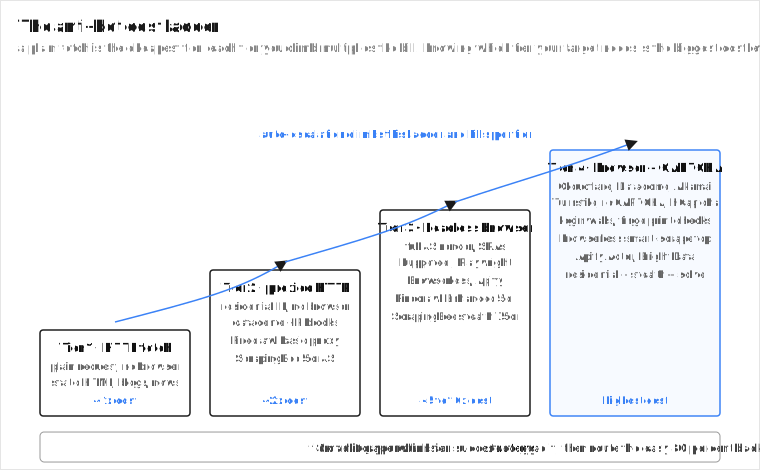
The cost ladder is real, and it is the single biggest cost lever in this category. A plain HTTP fetch is the cheapest tier. A proxied HTTP fetch is a small step up. A full headless browser is 5 to 10 times the cost. A browser plus CAPTCHA solve is more again. Tools that hide this ladder behind one call (Browserless Smart Scrape, Firecrawl Enhanced Mode) are convenient, but they charge you per tier they climb.
The anti-bot cost ladder. Every scraper climbs it. The `strategy` field in Smart Scrape and the `auto` proxy setting in Firecrawl exist to keep you on the lowest tier that works. Send open pages to tier 1 and your bill collapses.
Knowing which tier your target actually needs is the biggest cost lever in this category. The hybrid-routing section comes back to it.
## The three workflows that decide it
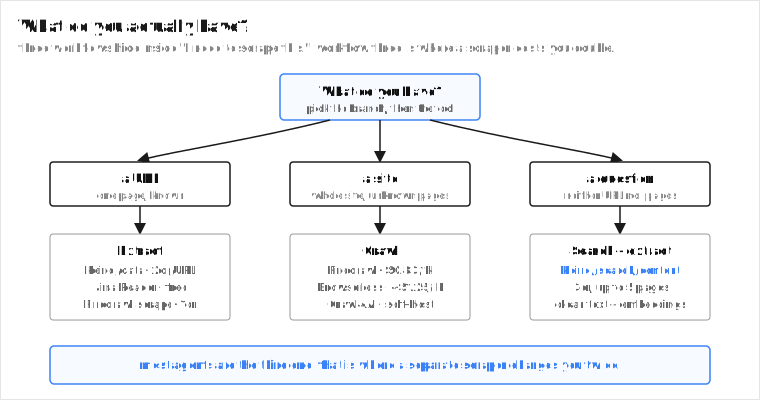
Three workflows hide inside "I need to scrape this." Picking the right workflow before picking the tool is the whole game.
1. **You know the URL.** You want one page turned into clean markdown or structured fields. This is extraction, not scraping. Jina Reader, Keiro `/data`, Firecrawl scrape, and ScrapingBee all do it. The cost question is per-URL, and the answer is usually a few tenths of a cent.
2. **You know the site, not the pages.** You want the whole site, or a section of it. This is crawling. Firecrawl, Browserless, Apify, and Crawl4AI do it. The cost question is per-page times N pages, and N is what kills you if you underestimate it.
3. **You do not know either.** You want pages about a topic, then their clean text. This is search plus extraction in one step. Keiro `/search/content` does it natively. Everyone else makes you search, then scrape each result, then clean each result, then embed each result.
Workflow three is where most agent teams actually live, and it is where the "I need a scraper" framing costs you money, because the scraping API gives you a list of pages and then charges you again to clean each one. Keiro does both in one call.
The three workflows. Most agent traffic is workflow three, and that is the one where a separate scraper bills you twice: once to find pages, once to clean them.
### A concrete RAG scenario, with the math
Say you are building a research agent that answers questions about public companies. It needs fresh pages about whichever ticker the user asks about. You do not know which pages you will need in advance, so this is workflow three. Here is the bill under two framings.
**Framing A, the scraper route.** You call a SERP API ($5/1k searches) to get 10 result URLs. Then you scrape each URL with a scraper ($0.99/1k pages for Firecrawl Standard, so ~$0.0099 for 10 pages). Then you run a cleaning step (your own pipeline, or a hosted one). Then you embed the chunks (a separate embedding call, a separate cost). Total for 10 pages of clean, embeddable text: roughly $0.05 search + $0.01 scraping + cleaning infra + embedding cost. And you maintain the cleaning pipeline, which breaks on SPAs and layout changes.
**Framing B, the search-plus-extraction route.** You call Keiro `/search/content` once, 3 credits. It returns the top 5 pages ranked, with their clean markdown body text, and chunked vector embeddings, in a single response. Total for 5 pages of clean, embedded text: $0.003. No cleaning pipeline, no embedding step, no second service. At 1,000 such calls (5,000 pages of clean content) that is about $3. The scraper route, before you even price the cleaning and embedding, is already past that on search alone.
The point is not that the scraper route is wrong. The point is that the scraper route bundles four jobs (search, fetch, clean, embed) and bills you for each, while the search-plus-extraction route bills you for one. If your agent is in workflow three, the math favors the second route by a factor of several, and it is also less infrastructure to run.
## A comparison of the 8
| API | Price per 1k pages | Output | JS rendering | Best for |
| --- | --- | --- | --- | --- |
| **Keiro** | $0.60 (search+content) / $2.00 (data extract) | clean markdown + embeddings | handled in content extraction | Clean content into RAG, no scraper needed |
| **Firecrawl** | $0.99 to $3.80 | markdown (default), JSON, HTML | included, no extra cost | Full scrape suite for AI |
| **Jina Reader** | ~$0.25 (token-based est.) | markdown | yes (SPAs, PDFs) | Free URL-to-markdown |
| **ScrapingBee** | $0.37 to $0.98 | HTML (markdown opt-in) | 5 credits/JS request | Cheap raw HTML at scale |
| **Browserless** | ~$1.25 | HTML, markdown (Smart Scrape) | full headless browser | Hard anti-bot, interactive automation |
| **Apify** | varies ($1 to $4) | per-Actor (HTML, JSON) | per-Actor | Niche protected sites via Actors |
| **Crawl4AI** | free (self-host) | markdown, JSON | yes | Open-source, full control |
| **Bright Data** | $499/mo min | raw data, datasets | enterprise anti-bot | Enterprise scale, hardest targets |
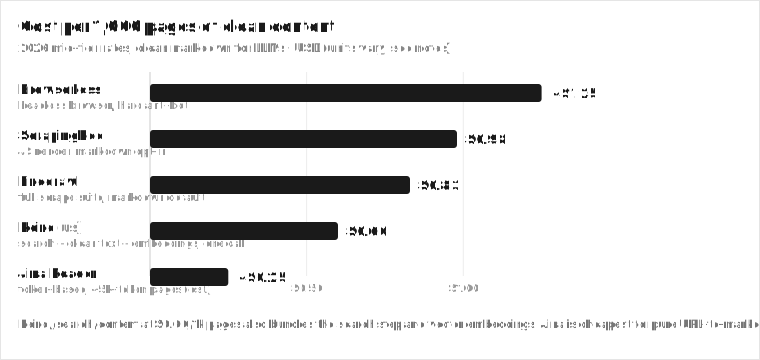
Pricing is 2026 mid-tier, normalized to clean-content cost where the unit is per page. Apify and Bright Data bill differently (compute units, enterprise minimums), so model your real workload. Verify on each provider's site.
Cost per 1,000 pages of clean content. Keiro /search/content is the floor for workflow three. Self-hosted Crawl4AI is free in software cost but not in TCO.
## The eight, in detail
Keiro the cheapest full-featured layer
This is our product, and the reason it is first is that it is not a scraper. It is the thing you reach for when a scraper is overkill.
Most agent scraping is workflow three: you have a question, you want pages, you want their clean text. Keiro `/api/v2/search/content` does that in one call. You give it a query, it returns the top pages ranked, with their clean markdown body text, and optionally chunked vector embeddings, in a single response. Three credits per call (up to 5 pages of clean text plus embeddings), which works out to about $0.48 per 1,000 pages of clean content at the Startup tier. No separate scrape step, no second service, no embedding pipeline. Free tier is 1,250 credits a month with no card, which is roughly 416 search-plus-content calls or 416 URL extractions, free.
If you already have the URLs, `/api/v2/data` extracts structured data from a single URL or an array of URLs in one call, 2 credits each. Batch extraction of many known URLs in one request is the part teams usually build a scraper fleet for, and it is one endpoint here.
```bash
curl -X POST https://api.keirolabs.cloud/api/v2/search/content \
-H "Authorization: Bearer keiro_your_api_key_here" \
-H "Content-Type: application/json" \
-d '{"query": "transformer architecture explained", "maxResults": 5, "mode": "ai", "embeddings.enabled": true}'
```
That returns ranked pages, clean text, and chunked embeddings. For an agent doing RAG, that is the whole pipeline in one call. The embeddings let you pick dimensions (384, 512, 768, or 1024) and a chunk size from 100 to 2,000 tokens, so you can tune the output to your model's context window without a separate chunking step.
**How it actually works.** Keiro is an index, not a scraper. It crawls and ranks 50B+ pages ahead of time, the way a search engine does, and serves clean content out of that index. Hot URLs refresh in seconds; trending pages in minutes. When you call `/search/content`, it ranks pages against your query, pulls the cached clean body text, and runs the embedding model in the same request. That is why one call costs $0.003 instead of $0.05 plus a pipeline. The trade is that it returns pages the index has. For a brand-new obscure page that is not yet indexed, scrape it directly with `/data`.
Best for workflow three: search plus clean text plus embeddings in one call, no scraper, no second service.
Price $1/1k credits, 500 free a month. /search/content is 3cr per call (up to 5 pages + embeddings) = ~$0.60/1k clean pages. /data is 2cr/URL.
The catch not a scraper. No crawl, no map, no interactive browser, no JS-rendering control. If you need to log in, click, or crawl a whole site, pair it with Firecrawl or Browserless.
Why it is here it leads the public QA benchmarks (SimpleQA 94, FreshQA 91, HotpotQA 82), so agents reading its content answer more accurately. The index is 50B+ pages and refreshes hot URLs in seconds.
Pros
Search plus clean text plus embeddings in one call. No scraper, no second service, no embedding step.
~$0.48/1k pages of clean content at Startup, and 1,250 credits a month free with no card.
/data takes an array of URLs, so batch extraction of known URLs is one request.
Tunable embeddings (384 to 1024 dims, 100 to 2,000 chunk size) without a separate pipeline.
Cons
Not a full scraper. No crawl, no map, no interactive browser, no JS-rendering control.
Index-based, so it returns pages the index has. For a brand-new obscure page, scrape it directly with /data.
Newer than the incumbents, so the scraping community and SDK ecosystem are smaller so far.
Firecrawl the full scraping suite for AI
The default pick when you actually need to scrape, and the category leader for workflow two.
Firecrawl is purpose-built for RAG. Markdown is the default output, JS rendering is included with no credit multiplier, and it covers scrape, crawl, map, search, extract, and interact in one API. It is open source (AGPL, 130k+ GitHub stars) and self-hostable, so teams with data-residency needs can run it themselves and zero out the API bill. It ships an official MCP server with 10 tools, which makes it the easiest scraper to wire into Claude Desktop or an agent. Since September 2026, pay-as-you-go is opt-in on paid plans: it adds credits in $5 increments up to a monthly limit you set, instead of auto-recharging a fixed amount.
The catch is the credit math, and it is the credit math that burns teams. The headline is "1 credit per page," but that is the floor. The modifiers stack. JSON extraction (LLM extraction) adds 4 credits per page. Enhanced Mode (premium proxies for hard-to-access sites) adds another 4. A page scraped with both JSON and Enhanced Mode is 1 + 4 + 4 = 9 credits. The same modifiers apply to crawl and search, because they use scrape internally for each page.
**The credit multiplier, in one table.**
| Option | Added credits/page | When it applies |
| --- | --- | --- |
| Base scrape | 1 | always |
| JSON format (LLM extraction) | +4 | you ask for structured fields |
| Enhanced Mode | +4 | hard-to-access sites, premium proxies |
| PDF parsing | +1 per PDF page | PDFs |
| Zero Data Retention | +1 | compliance |
JSON plus Enhanced on one page = 9 credits. At the $99/mo Standard tier (100k credits) that is $0.0089 per such page, or $8.91/1k ($7.47/1k billed annually). At the $19/mo Hobby tier it is worse. The same modifiers apply to crawl and search, because they use scrape internally for each page.
Enhanced Mode has a proxy strategy setting (`basic`, `enhanced`, `auto`): `auto` tries `basic` first and only bills the 5-credit `enhanced` cost if `basic` fails, so most pages stay cheap if your target set is mostly open. The per-page cost also swings with tier: $3.80/1k at the Hobby tier ($19/mo for 5,000 credits), dropping to $0.99/1k at the Standard tier ($99/mo for 100k credits). For a team doing full-site crawl plus structured extraction at moderate volume, model the credit multiplier before you commit.
Best for workflow two: crawling a whole site into markdown for RAG, with structured extraction when you need fields.
Price $0.99/1k at Standard (100k for $99) up to $3.80/1k at Hobby ($19/mo). Free 1,000 credits/mo. Self-hostable.
The catch credit multipliers stack. JSON + Enhanced Mode = 9 credits/page, not 1. Low-volume tiers are expensive per page.
Why it is here markdown by default, JS included, crawl plus map plus search plus extract plus interact, open source, official MCP server. Best-in-class markdown cleaning for LLM context.
Pros
Markdown by default, JS included, crawl plus map plus search plus extract plus interact in one API.
Open source (AGPL, 130k+ stars) and self-hostable, with an official MCP server.
Best-in-class markdown cleaning for LLM context.
Pay-as-you-go is opt-in and adds credits in $5 increments up to a monthly limit you set.
Cons
Low-volume per-page cost is high ($3.80/1k at Hobby).
The 1-credit-per-page headline becomes 9 credits with JSON plus Enhanced Mode.
Overkill if you only need clean text from known URLs (Keiro /data or Jina do that cheaper).
J Jina Reader free URL-to-markdown
The lowest-friction extraction tool that exists. Prefix `r.jina.ai/` to any URL and get back clean markdown. No API key required for the free tier (20 RPM), and a free key gets 200 RPM plus a one-time 10-million-token welcome grant shared across Reader, Embeddings, and Reranker. It handles SPAs, PDFs, and Office docs. Open source (Apache 2.0), self-hostable for unlimited free use. Elastic acquired Jina in October 2025; pricing held.
The catch is token-based billing, and it is the thing that surprises people at scale. Pay-as-you-go is $0.05 per 1M tokens, so a 5k-token page is about $0.00025, or $0.25/1k pages. That looks cheaper than everything else in the table, and for short pages it is. But large pages cost proportionally more (a 25k-token court ruling is $0.00125 each), and the 10M free tokens are a one-time grant, not a recurring allowance. It is also single-page extraction, not crawling.
The right framing for Jina is "I have a URL and I want markdown now, free." If that is your job, it is hard to beat. If your job is "I have 10,000 URLs and want them all chunked and embedded," you want Keiro `/data` or Firecrawl, because Jina has no batch, no crawl, and no embedding in the same call.
Best for workflow one at the prototype stage: one known URL, one markdown response, no key, free.
The catch token-based, so cost scales with output length and gets unpredictable on big pages. 10M free tokens are one-time, not recurring.
Why it is here `r.jina.ai/{url}` is the fastest path from a URL to markdown that exists. Nothing else in the table is this easy to start with.
Pros
Free, no-key, r.jina.ai/{url}. Hard to beat for prototyping.
Markdown, PDFs, SPAs, image captioning.
Open source (Apache 2.0) and self-hostable.
Cons
Token-based, so cost scales with output length and gets unpredictable on big pages.
Single-page only. No crawl, no map, no structured extraction at scale.
10M free tokens are a one-time grant, not a monthly allowance.
S ScrapingBee cheap raw HTML at scale
The cheap raw-HTML-at-scale pick. Credit-based, with a JS-rendered request costing 5 credits (premium residential proxy 25, stealth 75). Per-1k-JS-page cost runs from $0.98 (Freelance, $49/mo) down to $0.37 (Enterprise, $599/mo). Strong anti-bot with residential and stealth proxies, and specialty endpoints for Amazon, Walmart, YouTube, and Google.
The catch is that raw HTML is the default. Markdown is an opt-in parameter, and there is no native crawl or map. So ScrapingBee assumes you already have parsing logic and want volume HTML cheap. If your agent wants clean markdown, you are paying ScrapingBee for the HTML and then building the cleaning on top, which is exactly the framing tax this guide is trying to get you out of.
**The credit multiplier.** A plain API call is 1 credit. JS rendering multiplies by 5. The stealth proxy multiplier is 75 credits per request, so a single stealth-rendered page on the Freelance plan is 75 credits, or about $0.0735 per page. That is $73.50/1k pages, not $0.98. The $0.98/1k headline is a 5-credit JS render with no stealth. Anti-bot escalates the price fast, and the multiplier is per request, not per 1k.
Oxylabs acquired ScrapingBee in June 2025, which has introduced some uncertainty about roadmap direction. Best when you already have a parsing pipeline and need volume raw HTML, or when one of the specialty endpoints (Amazon, Google) is exactly your target.
Best for teams with existing parsing logic that want volume raw HTML at the lowest per-page cost.
Price $0.98/1k JS pages (Freelance) down to $0.37/1k (Enterprise). JS render = 5 credits, stealth = 75.
The catch raw HTML by default. Markdown is opt-in. No native crawl or map. Stealth at 75 credits/request is $73/1k, not $0.98. Post-Oxylabs direction is unclear.
Why it is here lowest per-page cost at high volume, with strong residential and stealth anti-bot and specialty endpoints for big sites.
Pros
Lowest per-page cost at high volume ($0.37/1k JS pages).
Strong residential and stealth anti-bot.
Specialty endpoints for Amazon, Walmart, YouTube, Google.
Cons
Raw HTML by default. Markdown is opt-in, no native crawl or map.
JS render costs 5 credits, stealth 75, so anti-bot escalates the price fast.
Post-Oxylabs acquisition direction is unclear.
B Browserless hard anti-bot and interactive automation
The headless-browser pick for hard anti-bot and interactive automation. One unit is up to 30 seconds of browser time, and it supports Puppeteer, Playwright, Selenium, BrowserQL (a GraphQL scraping language), REST, and an MCP server. Smart Scrape is the headline feature: one call walks a 4-tier cascade and stops as soon as it gets data.
**How Smart Scrape actually climbs the ladder.**
| Tier | What it does | `strategy` value | When it escalates |
| --- | --- | --- | --- |
| 1 | fast HTTP fetch, browser fingerprint | `http-fetch` | datacenter IP blocked |
| 2 | proxied HTTP, residential IP | `http-proxy` | page needs JS render |
| 3 | full stealth headless browser | `browser` | CAPTCHA or bot challenge |
| 4 | browser + CAPTCHA solve (Turnstile, reCAPTCHA, hCaptcha) | `browser-captcha` | hardest targets |
The `strategy` field in the response tells you which tier succeeded, and `attempted` shows the full sequence tried. A single request can return `html`, `markdown`, `screenshot`, `pdf`, and `links` together. Stealth routes handle fingerprint mitigation for Cloudflare-grade targets. About $1.25/1k pages at the Starter tier ($140/mo, 180k units), varying with page load time.
BrowserQL also has a `reconnect` mutation that hands a BQL session off to Puppeteer or Playwright mid-query, which is useful when declarative scraping needs to drop into imperative browser code for a login step.
The catch is the time-based unit model, and it is the thing that makes budgeting hard. Cost per page depends on how long the page takes to render and whether Smart Scrape had to climb to the browser tier. A 2-second static page is cheap. A 15-second SPA that triggers the CAPTCHA tier is expensive. You cannot predict per-page cost the way you can with per-page pricing. Best when you need real browser automation (clicking, logging in, navigating multi-step flows), not just content. For agents that only want clean text from open pages, this is overkill and the bill will show it.
Best for workflow two and the hard 5 percent: interactive automation, login flows, Cloudflare-grade anti-bot, multi-step browser paths.
The catch time-based units make per-page cost variable. A page that climbs Smart Scrape to the CAPTCHA tier costs many units.
Why it is here Smart Scrape is the cleanest auto-escalation cascade in the category, and Puppeteer/Playwright/BrowserQL/MCP covers every surface an agent might call from.
Pros
Full browser control across Puppeteer, Playwright, Selenium, BrowserQL.
Smart Scrape auto-escalation across 4 tiers, with the strategy field for cost visibility.
REST, WebSocket, GraphQL, and MCP surfaces. BrowserQL reconnect to Puppeteer/Playwright.
Cons
Time-based units make per-page cost variable and hard to budget.
Heavier than a pure extraction API for simple clean-content needs.
Annual billing (30% off) locks you into a cycle.
A Apify niche protected sites via Actors
The Actor-marketplace pick for niche protected sites. If you need Amazon listings, LinkedIn profiles, or Google Maps places, there is almost certainly a pre-built Actor that already cracks the anti-bot and returns structured JSON. Free tier is $5/mo in credits (about 600 Cheerio runs or 150 Playwright runs). Paid plans start at $29/mo.
The catch is triple-layer billing, and it is the thing that makes Apify cost unpredictable. You pay for compute units ($0.20/CU on Free and Starter, dropping to $0.13/CU on Business, where 1 CU is 1 GB RAM for 1 hour), for proxy usage, and for Actor-level fees. Predicting cost requires modeling all three, and an Actor author can change their pricing model under you.
**The 2026 billing shift.** Apify is standardizing the marketplace on pay-per-event (PPE) and retiring the older rental and pay-per-result models. Rental Actors cannot be published after April 1, 2026 and are fully retired October 1, 2026; about 2,000 Actors have already migrated from pay-per-result to granular PPE. The stated reason is AI-agent readiness: PPE lets an autonomous agent or MCP server pay-as-it-go instead of managing dozens of $50/mo subscriptions. That is a real improvement for billing predictability, but it also means an Actor author now defines the unit you pay for, so you still have to read the Actor's pricing page.
Best when a specific Actor already does your hard target and you value not building it yourself. For clean-content extraction from open pages, it is overkill: you would spin up a Cheerio Actor to do what Jina does for free with one URL prefix.
Best for a specific protected site (Amazon, LinkedIn, Google Maps) where a pre-built Actor already cracks the anti-bot.
Price $5/mo free credits. Starter $29/mo. CU-based at $0.20/CU (1 GB RAM x 1hr) plus proxy plus Actor PPE fees.
The catch triple-layer billing (compute + proxy + Actor) makes cost hard to predict. Actor authors own pricing and can change it.
Why it is here the Actor marketplace is the densest library of pre-built cracks for the hardest niche targets.
Pros
Pre-built Actors for the hardest protected sites (Amazon, LinkedIn, Maps).
Full proxy infrastructure included, structured JSON output.
$5/mo free credits, no card. PPE billing is increasingly agent-friendly.
Cons
Triple-layer billing (compute + proxy + Actor) makes cost hard to predict.
You depend on Actor authors for maintenance and pricing changes.
Overkill for clean-content extraction from open pages.
C Crawl4AI open-source self-host, free
The open-source, self-host, free pick. 60k+ GitHub stars, Apache 2.0, markdown and JSON output, bring-your-own-LLM for extraction. You own all infrastructure, proxies, and anti-bot handling, and you pay nothing per page.
**How it actually works in 2026.** Crawl4AI runs locally or in Docker with a 3-tier browser pool (permanent, hot, cold) and a janitor that cleans up idle sessions. Extraction is provider-agnostic through LiteLLM, so you point it at OpenAI, Anthropic, Ollama, Groq, Mistral, or Gemini and pass a JSON schema. v0.9.0 (June 2026) made the Docker server secure-by-default: auth required, loopback bind unless you set a token, and the inline Python hooks API was removed for security and replaced with declarative hooks, a fixed set of server-validated actions like `add_cookies`, `set_headers`, and `block_resources`. No more code execution from hook input. It ships an MCP server for Claude Code, a job queue with webhooks for async LLM extraction, and a `crwl` CLI. Prefetch mode (v0.8.0) is 5 to 10x faster on deep crawls.
The catch is total cost of ownership, and it is the thing teams underestimate. Free in software cost, but you run the servers, maintain the proxies, and handle anti-bot yourself. A residential proxy pool is a monthly bill. Anti-bot is a moving target, so maintenance is ongoing engineering time. The break-even point against a managed API depends on your volume and your engineering cost: at high enough volume, self-hosting wins on raw per-page cost, and the trade is that you now own a scraping platform.
Best for teams with Python infrastructure and the engineering capacity to run a crawler, who want zero per-page cost and full control, and who already have or are willing to build proxy and anti-bot expertise in-house.
Best for teams with Python infra and anti-bot expertise who want zero per-page cost and full control.
Price free (Apache 2.0, 60k+ stars). You own infra, proxies, and anti-bot.
The catch TCO is not zero. Servers, proxies, and anti-bot maintenance are real engineering cost.
Why it is here the most mature open-source option, declarative hooks, LiteLLM provider-agnostic extraction, MCP server, large community.
Pros
Free, open source, no per-page cost, full control.
LiteLLM provider-agnostic extraction, declarative hooks, 3-tier browser pool, MCP server.
Large community (60k+ stars) and active development (v0.9.x in July 2026).
Cons
You own infrastructure, proxies, and anti-bot. TCO is not zero.
No managed SLA, no built-in anti-bot at the Firecrawl/Bright Data level.
More setup than a managed API.
B Bright Data enterprise anti-bot at scale
The enterprise anti-bot pick at scale. 99.3% success on LinkedIn, Amazon, and Google in independent tests, with the strongest proxy infrastructure in the category. Datasets, scraping browser, and SERP APIs.
The catch is the $499/month minimum per product and enterprise onboarding friction. Bright Data is built for procurement, not for a developer prototyping an agent on a Sunday. Best for large teams that need the hardest targets at very high volume and have the budget and procurement process for it. For everyone else, the same hard targets are often reachable through an Apify Actor or Browserless Smart Scrape at a fraction of the commitment.
Best for large teams that need the hardest targets at very high volume and have procurement budget.
Price $499/mo minimum per product. Enterprise onboarding.
The catch $499/mo floor and enterprise sales. Not developer-first.
Why it is here 99.3% on LinkedIn, Amazon, and Google. Strongest proxy infrastructure in the category.
Pros
Strongest anti-bot infrastructure, 99.3% on the hardest targets.
Datasets, scraping browser, SERP, and enterprise support.
Built for very high volume.
Cons
$499/month minimum per product, enterprise sales.
Overkill for anything but the hardest, highest-volume targets.
Not developer-first; built for procurement, not prototyping.
## How to choose: route by difficulty
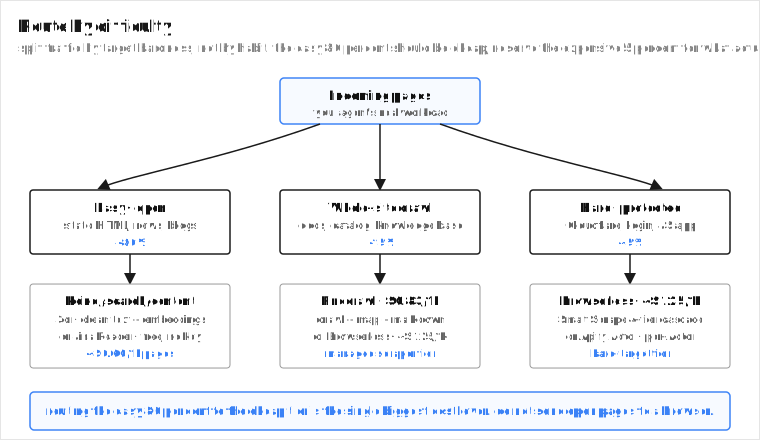
The biggest cost lever in scraping for AI is not which tool you pick. It is routing your traffic by target difficulty so the easy 80 percent goes to the cheap tier and only the hard 5 percent goes to the expensive tier. Teams that send everything to one scraper pay browser-tier prices for pages an HTTP fetch would have handled. Teams that route by difficulty pay the cheap price for the cheap pages and reserve the expensive price for the pages that actually need it.
Route by difficulty. The easy 80 percent of pages should hit the cheap tier. Reserving the expensive 5 percent for what actually needs a browser is the biggest cost lever in this category.
A practical hybrid most agent teams land on looks like this:
- **Open pages and search (the 80 percent).** Keiro `/search/content` for search plus clean text plus embeddings in one call, or Jina Reader for one-off URLs. Free or near-free per page.
- **Whole-site crawl (the 15 percent).** Firecrawl for crawl plus map plus markdown, or Browserless when the site needs a real browser.
- **Hard, protected, interactive (the 5 percent).** Browserless Smart Scrape for Cloudflare-grade and interactive flows, or an Apify Actor for a specific protected target like Amazon or LinkedIn.
- **Enterprise scale on the hardest targets.** Bright Data, when volume and procurement justify the $499/mo floor.
Three more principles, then the short version.
**Know the workflow before the tool.** If you know the URL, use Keiro `/data` or Jina Reader. If you know the site, use Firecrawl or Browserless to crawl. If you know neither, use Keiro `/search/content` to search and extract in one call. Most agent teams are in the third bucket and are paying for a scraper they do not need.
**Match the anti-bot to the target.** Open pages: any extraction API works. Cloudflare-grade or login-walled: Browserless or Bright Data. Niche protected (Amazon, LinkedIn): an Apify Actor. Picking a heavier tool than you need is how scraping bills get big. Picking a lighter tool than you need is how success rates crater. The `strategy` field in Smart Scrape and the success-rate stats on Bright Data are the signals to watch. Read them, then move the easy tier-1 pages off the browser.
**Cost per clean page, not per request.** Normalize to the cost of 1,000 pages of clean markdown or structured fields, including JS-rendering multipliers (ScrapingBee 5 credits, stealth 75), token fees (Jina), and credit traps (Firecrawl JSON + Enhanced at 9 credits). The headline per-page number is the floor, and the floor is usually not what you pay.
## Takeaways
The best web scraping API for AI agents is the one that gets you clean content with the fewest steps. For most agents that is Keiro `/search/content`, because it searches, cleans, and embeds in one call at $0.60/1k pages, free 500 credits a month, and you skip the scraper entirely. When you actually need to crawl, interact, or crack hard anti-bot, Firecrawl is the full-suite leader, Browserless for interactive and stealth, Apify for niche protected sites, Bright Data for enterprise scale, Crawl4AI to self-host for free.
If you are paying a scraping API to clean pages an agent could have gotten clean in one call from a search-plus-extraction API, that is the bill to cut. Start free with 500 Keiro credits on the [pricing page](/pricing), or see the [best AI search API guide](/best-ai-search-api) and the [Firecrawl alternative breakdown](/firecrawl-alternative).
## FAQ
### Do AI agents need a scraping API or a search API?
Often a search API. An agent wants clean text in context, not HTML. Keiro `/search/content` searches the web and returns clean markdown plus embeddings in one call, so you skip the scrape step entirely. You need a scraper (Firecrawl, Browserless) when you must crawl a whole site, interact with a page, or crack hard anti-bot. The framing is the lever: "get my agent clean content about X" usually lands on a search-plus-extraction API. "Scrape this URL" usually lands on a scraper plus a cleaning pipeline.
### What is the cheapest way to get clean content into an agent?
For known URLs, Jina Reader (free, `r.jina.ai/{url}`) or Keiro `/data` ($2/1k URLs). For search plus clean content, Keiro `/search/content` at $0.60/1k pages, free 500 credits a month. For raw HTML at high volume, ScrapingBee ($0.37/1k JS pages). Cheapest depends on whether you have the URL, need search, or need JS rendering. The cheapest path that also bundles embeddings is Keiro `/search/content`, because the embedding step is in the same call.
### Why is Keiro not a scraper?
It is a search-plus-extraction API. It does not crawl whole sites, control a browser, or interact with pages. What it does is return clean markdown and structured data (and embeddings) for pages, either from a search query (`/search/content`) or from URLs you give it (`/data`, which takes an array). For the 80 percent of agent scraping that is "give me clean content about X," that is enough, and it is cheaper because it bundles the search step and the embedding step into the same call.
### Which scraping API is best for RAG?
Keiro `/search/content` for search plus clean text plus embeddings in one call. Firecrawl for crawling a site into markdown. Jina Reader for turning known URLs into markdown cheaply. The RAG question is "clean, chunked, embeddable text with the fewest steps," and that favors extraction over raw scraping. If you are building a knowledge base from a known site, Firecrawl is the workflow-two answer. If you are answering questions over the open web, Keiro `/search/content` is the workflow-three answer.
### How do I handle JavaScript-heavy or anti-bot-protected sites?
Browserless for general JS and stealth (Puppeteer, Playwright, Smart Scrape auto-escalation across 4 tiers, `strategy` field for visibility). ScrapingBee for cheap JS at scale with residential and stealth proxies. Bright Data for the hardest enterprise targets (99.3% on LinkedIn, Amazon, and Google). Apify for niche protected sites with a pre-built Actor. Keiro and Jina handle JS in extraction but are not built for login-walled or aggressive anti-bot.
### Is Firecrawl really 1 credit per page?
The headline is 1 credit per page for a basic scrape. The modifiers stack: JSON extraction adds 4 credits, Enhanced Mode adds another 4, so a page with both is 1 + 4 + 4 = 9 credits. The same modifiers apply to crawl and search, because they use scrape internally. At the Hobby tier that is $3.80/1k pages, dropping to $0.99/1k at the Standard tier at 100k pages. Enhanced Mode has an `auto` proxy strategy that tries `basic` first and only bills the 5-credit `enhanced` cost if `basic` fails, so most open pages stay at 1 credit. Model the multiplier for your real workload.
### What is Smart Scrape and why does the strategy field matter?
Smart Scrape is Browserless's one-call cascade across four tiers: fast HTTP fetch, proxied HTTP, headless browser, and browser plus CAPTCHA solve. It stops as soon as a tier returns data, and the response includes a `strategy` field telling you which tier succeeded (plus an `attempted` array with the full sequence). That field is the cost signal: if 90 percent of your pages come back as `http-fetch`, you are paying tier-1 prices. If they come back as `browser-captcha`, you are paying the top tier, and you should ask whether those pages actually need a browser or whether a cheaper tool would do.
### Can I self-host a scraping API for free?
Yes. Crawl4AI (Apache 2.0, 60k+ stars, declarative hooks, LiteLLM extraction, MCP server) and Firecrawl (AGPL, 130k+ stars) are self-hostable with no per-page fee. The trade is infrastructure, proxy, and anti-bot TCO, which is real engineering cost even though the software is free. Best for teams with Python infra and the capacity to run it. For most teams, managed wins on time, and the managed bill is smaller than the engineering cost of running your own.
### How much does Keiro cost for scraping-style workloads?
$1/1k credits, 500 free a month. `/search/content` is 3 credits per call (returns up to 5 pages of clean text plus optional embeddings), so about $0.60/1k pages of clean content. `/data` is 2 credits per URL (or an array of URLs in one call), about $2/1k URLs. No separate embedding or extraction fee, because both are bundled in the call. Free tier allows commercial use, no card required.
 Keiro the cheapest full-featured layer
 Firecrawl the full scraping suite for AI